Flats & Dust Changes
Inspect dust shadows and compare flats across nights. Flat groups keep each light matched to flats from the same optical state.
Calibration guides
- Calibration Libraries
- Calibration Grades & Coverage
- Flats & Dust Changes
- Calibration Masters & Settings
Dust in flats
Grading finds the shadows in each flat. A spot is a small patch that
passes less light than the response around it. Dust further up the train
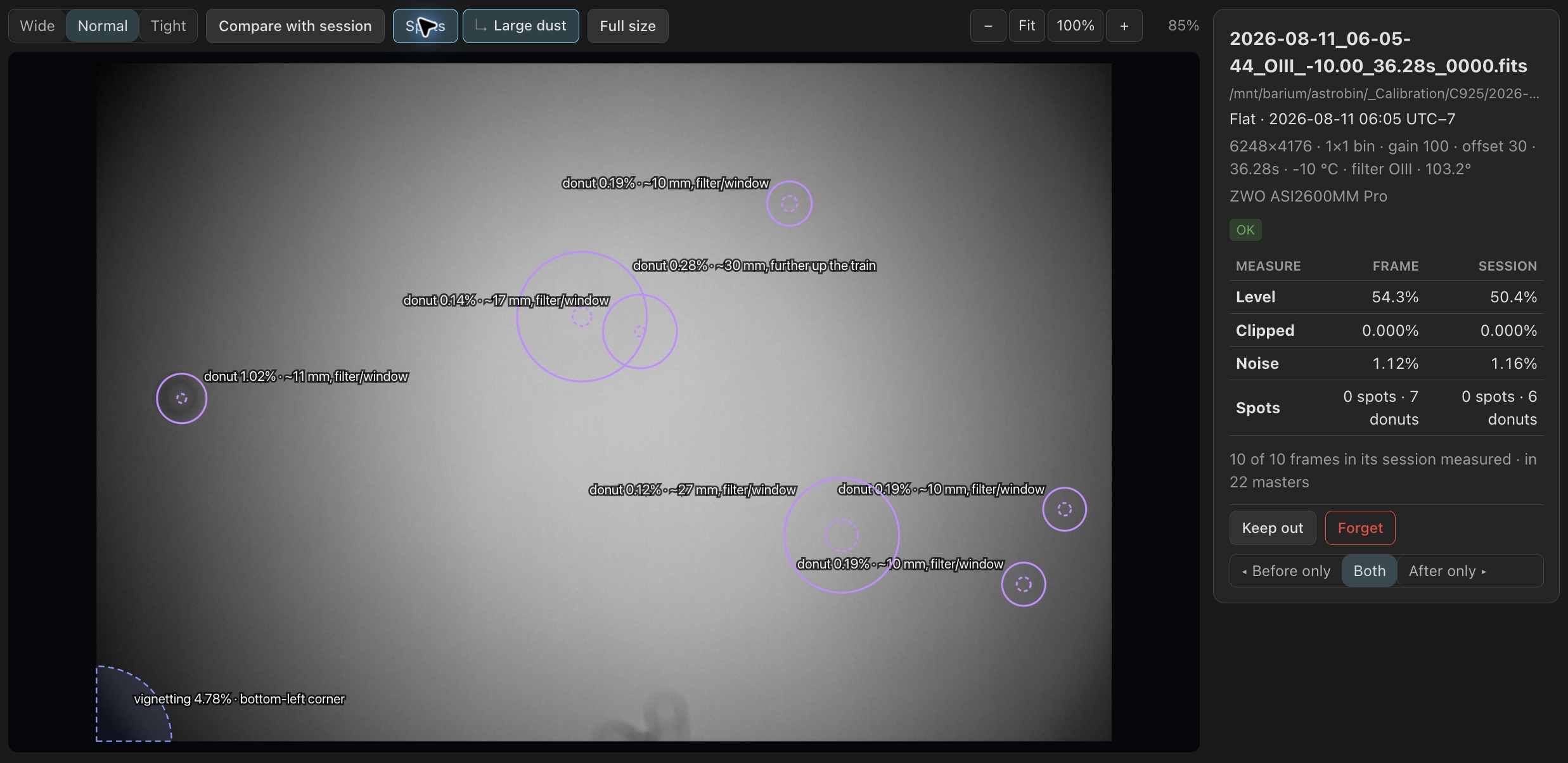
casts large, faint shadows: out-of-focus disks, such as a
RedCat61's 600-pixel disks under half a percent deep, and
donuts, dust seen through an SCT's central obstruction.
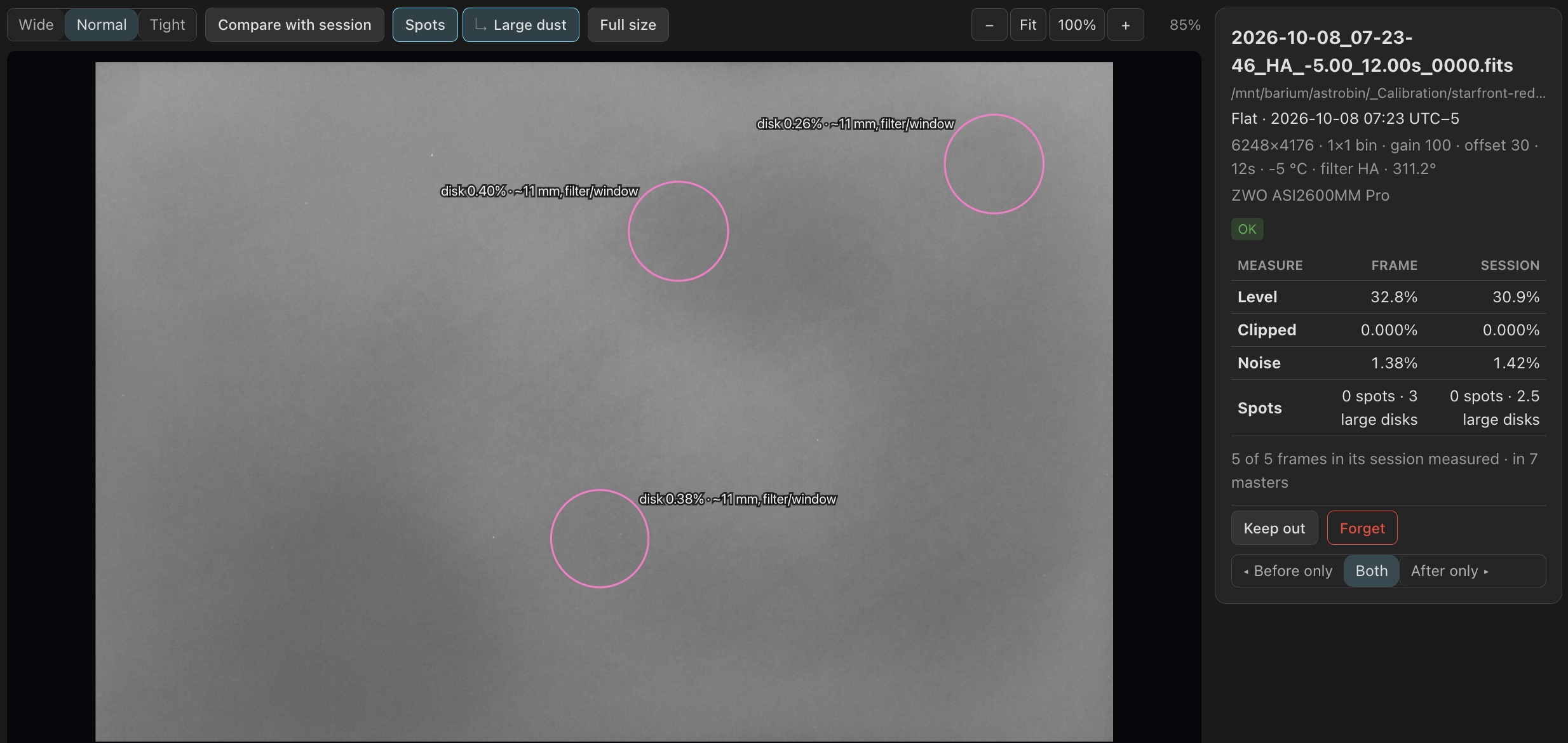
These count apart, as large dust: 15 spots · 3 large disks. A
spot of a few pixels must clear a threshold raised for the size of the
frame, so a large sensor does not count its own noise.
Spots, above the viewer, draws what grading found at its
shape: a spot as its box, a disk as its rim, a donut as its ring and hole.
Large dust, nested under Spots, turns the disks, donuts and
vignetting on and off. Vignetting, a shadow hanging from an edge or corner
such as an off-axis guider's prism, draws dashed and never counts as dust.
Each large mark gives its depth and, when the header gives the focal ratio
and pixel size, how far in front of the sensor the dust sits:
disk 0.33% · ~11 mm, filter/window. Hover or tap a mark for its
numbers.
With Compare with session on, the marks show the session's own dust, found on the stack of its flats, with the number of flats each shows in. A feature found in only one flat, such as a drying drop of dew, appears as a transient. Only shadows count: a star in a sky flat adds light, so it never counts as a spot or as dew.
Flat groups
Dust can move, appear or disappear between nights. Calibrating a light with flats from the other side of that change leaves a faint residual pattern. PSF Guard measures how alike each night's flats are, keeps nights that differ out of one master, and gives each light flats from its own side of each change. The full rules are in docs/CALIBRATION_LIBRARY.md.
Measuring flats
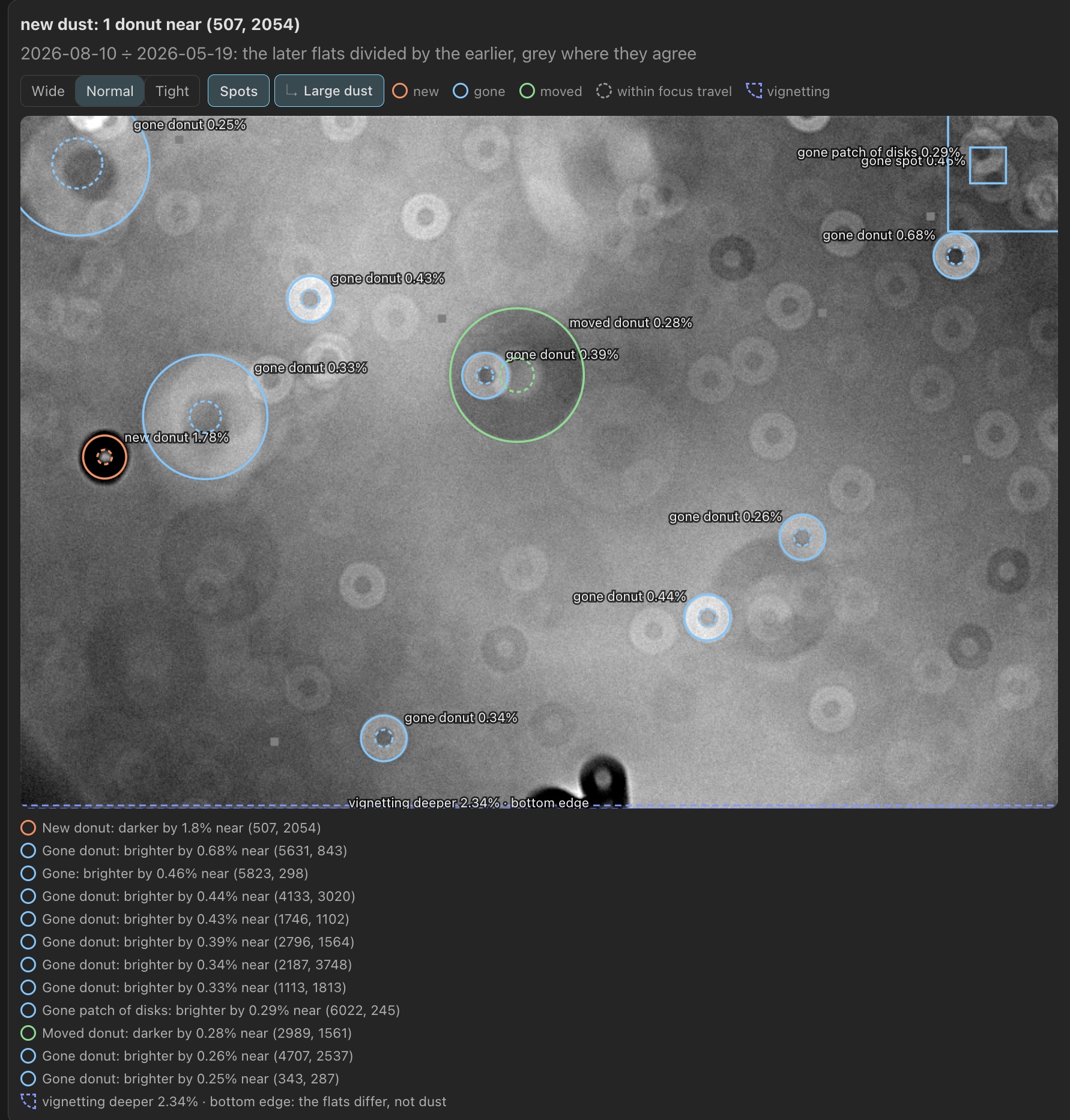
PSF Guard combines each session of at least two flats into one response, and compares two responses as later ÷ earlier. That gives two numbers, in percent of the sky background a light would be left with: dust, the deepest shadow that arrived, left or moved, and light pattern, the largest broad difference, such as a changed vignette, after removing a linear gradient. The view shows dust movement that focus travel can explain, such as movement of an SCT's donuts, but excludes it from the measurement. A guider's corner shadow that turns with the camera counts as vignetting, held to the light-pattern limit, not as new dust.
Measuring flats is a job of its own in the header's job
line, with the rig, 12 of 40 sessions and
Pause. It measures only the sessions an import, sync, upload,
forget or duplicate repair touched, so an up-to-date catalog needs no pixel reads.
The rig on screen in Frames goes first. Pause keeps completed measurements and
prevents new passes, even if flats change. Choose Resume in the
jobs list or on Calibration to continue. Restarting the server also resumes
measuring. A changed limit regroups at once from the stored numbers.
Angles and response families
A rotator angle in the header is a guide, not proof of the light path.
Within one rig, filter, focal length and sensor mode, angles whose gaps stay
within the rig's rotation tolerance (at most 2°) count as one, so a rotator
that wanders by a degree or two still compares its flats. Angles whose
flats measure alike form one response family, named in
Frames by its measured angle range: 100.1–104.4°, or
72.6° & 82.2°. Flats shot through a reducer are never
compared with flats shot without it. Flats that record no angle join the one
family they measure alike with, or else serve a light only when no flat of
its angle does.
Groups, splits and changes
Within a family, nights join into groups in time order while their dust and light pattern stay within the limits, 1% and 2% by default. Every night in a group must match every other night within these limits. A gradual drift therefore cannot combine dissimilar nights into one master. Between two groups lies a split. Splits that overlap in time, with shadows at the same place on the sensor, form one change. A change seen in two filters, or in two families of one filter, is on the camera side and applies to every light of the rig; one seen in one filter applies to that filter only.
How PSF Guard chooses flats for a light
PSF Guard selects flats in three steps:
- Determine which side of each change the light belongs to. PSF Guard uses the capture time if it falls outside the change's time window. Otherwise, it checks the imaging session, then compares the light's pixels with the change map. If none of these methods can place the light, its side remains undetermined.
- Choose a response family. PSF Guard starts with the family at the light's recorded angle. If two families lie within 10°, as can happen after a rotator re-homes, it compares the light's pixels. It chooses a family at a different angle only when the rotator's epochs or lights from another filter support that choice.
- Choose flats within that family. PSF Guard uses flats at the light's angle and on the same side of every change. It can use another angle's flats if measurements agree across several nights or the light's pixels identified that family. If no flats match on the light's side, PSF Guard tries these alternatives in order: flats at the nearest angle, if angle has little effect on the rig's flats; flats at the original angle corrected across a camera-side change; or flats at the original angle from the other side, with a warning.
A light's Calibration panel explains how PSF Guard chose its flats, under Chosen by, and shows its Flat family when that was not the one at its recorded angle. Flats from across a change raises a Check on a light that had to take flats from the other side, or whose side remains undetermined. Nights measured alike mix in one master with no Check.
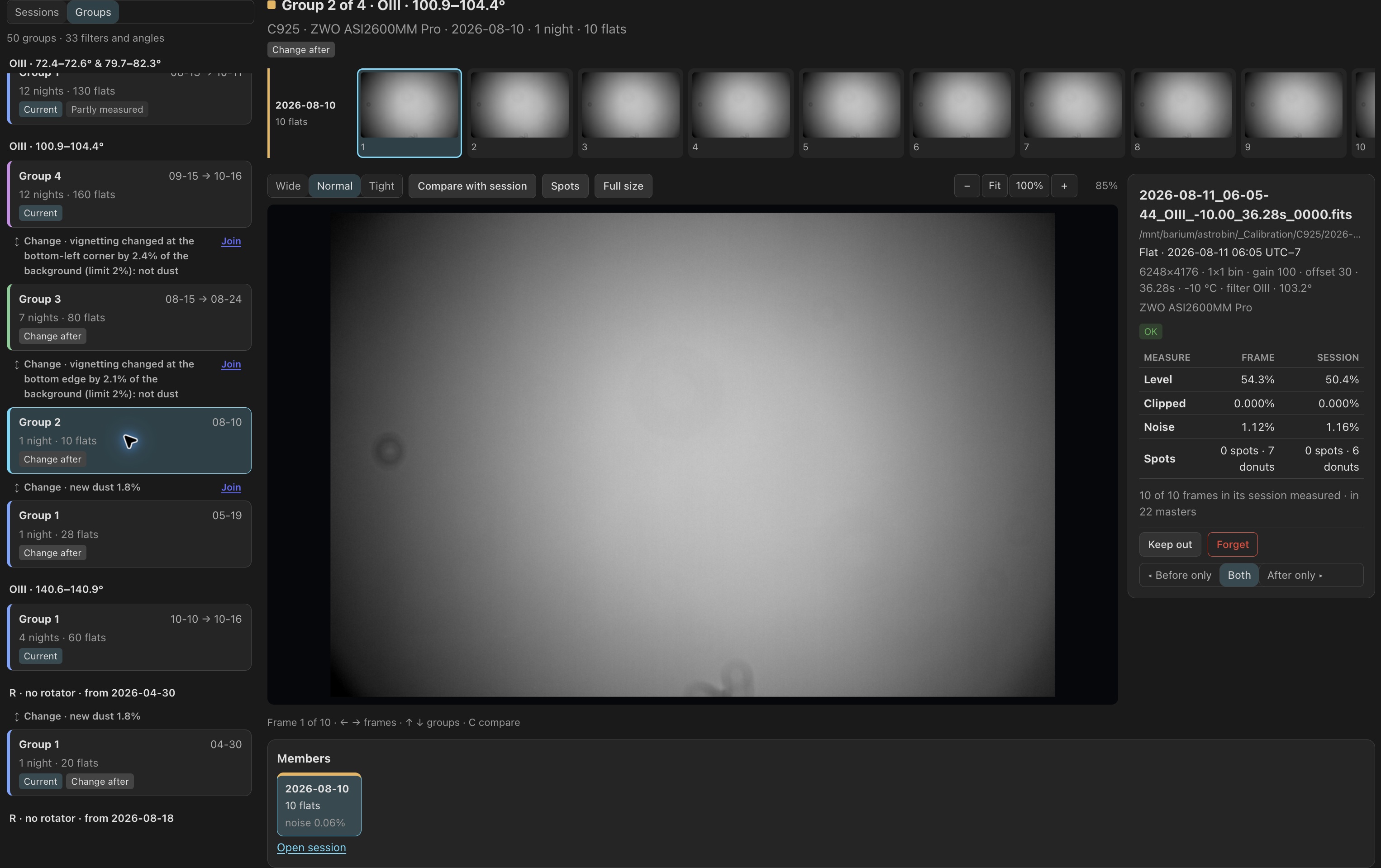
Flat groups in Frames
When the list includes flats (Type All or Flat):
- Each flat session carries its group, such as Group 3 · 09-07 → 09-16, 4 nights, with a coloured band down its edge.
- A split is a line above the newest session of the older group, with its reason: the light pattern changed by 2.6% (limit 2%). A camera-side change shows once, with its depth, the filters it was seen in, and its window on the rig's clock.
- Compare, on a split or a change, shows the later flats divided by the earlier, at ±3%, ±1% or ±0.5%, with new and departed shadows circled.
- A line above the list gives each rig's limits and unmeasured sessions, and ends in Edit limits, which opens Settings › Calibration › Flat groups on the rig's own value or the global one.
Groups, under Sessions | Groups, lists the groups themselves, newest first by rig, filter and angle (such as G · 3.2°), with the split between neighbours and its reason in between: Change · new dust 1.6%, Split · pattern 2.6%. Badges identify the Current group used for new lights, groups that are Partly measured, and groups with a Change after them. ↑ and ↓ move between groups. A group shows its flats in the strip night by night, then Members (its nights), Why they belong together (how far apart they measured, against the limits), Its edges (each side's split or change, with Compare) and What it feeds: its flat masters, and the lights calibrated with those flats, grouped by project, each opening Images on exactly those lights. In a project scope, the groups either side of the project's own show dimmed as Neighbour.
Choose by hand
You can override incorrect measurements:
- Split here, on a night under Members, starts a new group at that night. PSF Guard uses capture times to match lights with flats from the same side of the split.
- Join, on the edge between two groups in the list, or Join with next and Join with previous under Its edges, makes two groups one, without the mixed-flats Check. Joining groups across a camera-side change displays a warning. That change still determines which side's flats PSF Guard uses for the filter's lights.
- A light's Calibration panel, under Choose its flats, offers Before and After for each change it was shot during, and Use group for one group's flats. Every light of its imaging session applies the choice to the whole run.
- Flat side…, in Images, sets Before, After or Reset on the selected lights, for each change they were shot during.
Edges chosen by hand read Split by you or Joined by
you, with the measured numbers beside them and Reset.
A choice whose flats or change are gone stays, shown as no longer applied,
until reset. Choices travel with Merge catalogs and sync pull.
Changing them needs write access and database management: the desktop app,
or a server started with --allow-database-management.
Flat group settings
Three settings sit under Settings › Calibration › Flat groups, for every rig or one. A change rebuilds the masters and stacks whose flats it changes.
| Setting | Default | Effect |
|---|---|---|
| Group flats | By measurement | By time only keeps one master per flat session, as before, and never measures the rig. |
| Dust split | 1% | Two nights share a master while their dust differs by less than this. |
| Light pattern split | 2% | The same for broad differences, such as a changed vignette. |
A read-only catalog, or one from an older build, groups flats by time.