N.I.N.A. Sync Plugin
The PSF Guard Sync plugin connects N.I.N.A. and its Target Scheduler catalog to a PSF Guard server. It uploads saved lights and calibration frames, pushes scheduler captures, pulls plans and reviewed grades back, and syncs Target Scheduler's flat coverage, without copying database files by hand.
Install the plugin
PSF Guard hosts a N.I.N.A. plugin repository. Add it once, and the plugin installs and updates from within N.I.N.A.:
- In N.I.N.A., open Options → General. Under
Plugin Repositories, click + and add
this URL:
https://nina-plugins.psf-guard.com/ - Open Plugins → Available, find PSF Guard Sync, install it, and restart N.I.N.A.
Pair N.I.N.A. with a catalog
For a new catalog in 0.12, open Settings → Databases → Import from Target Scheduler and choose Use the PSF Guard Sync plugin. Add a shared image folder or an empty folder for uploads, then click Create catalog for plugin. The pairing controls open automatically; no local TS database file is required. For an existing catalog, click its Edit button instead.

- In PSF Guard, open Settings → Databases and edit the destination catalog.
- To receive image files, tick Accept remote image uploads, choose a Receive directory from the catalog's image folders, and pick a Folder layout: Receive directory keeps every upload in that folder; Match catalog files each one into folders laid out like the rest of the catalog. Save the catalog.
- Click Generate pairing code under Connect PSF Guard Sync in N.I.N.A., and copy the code.
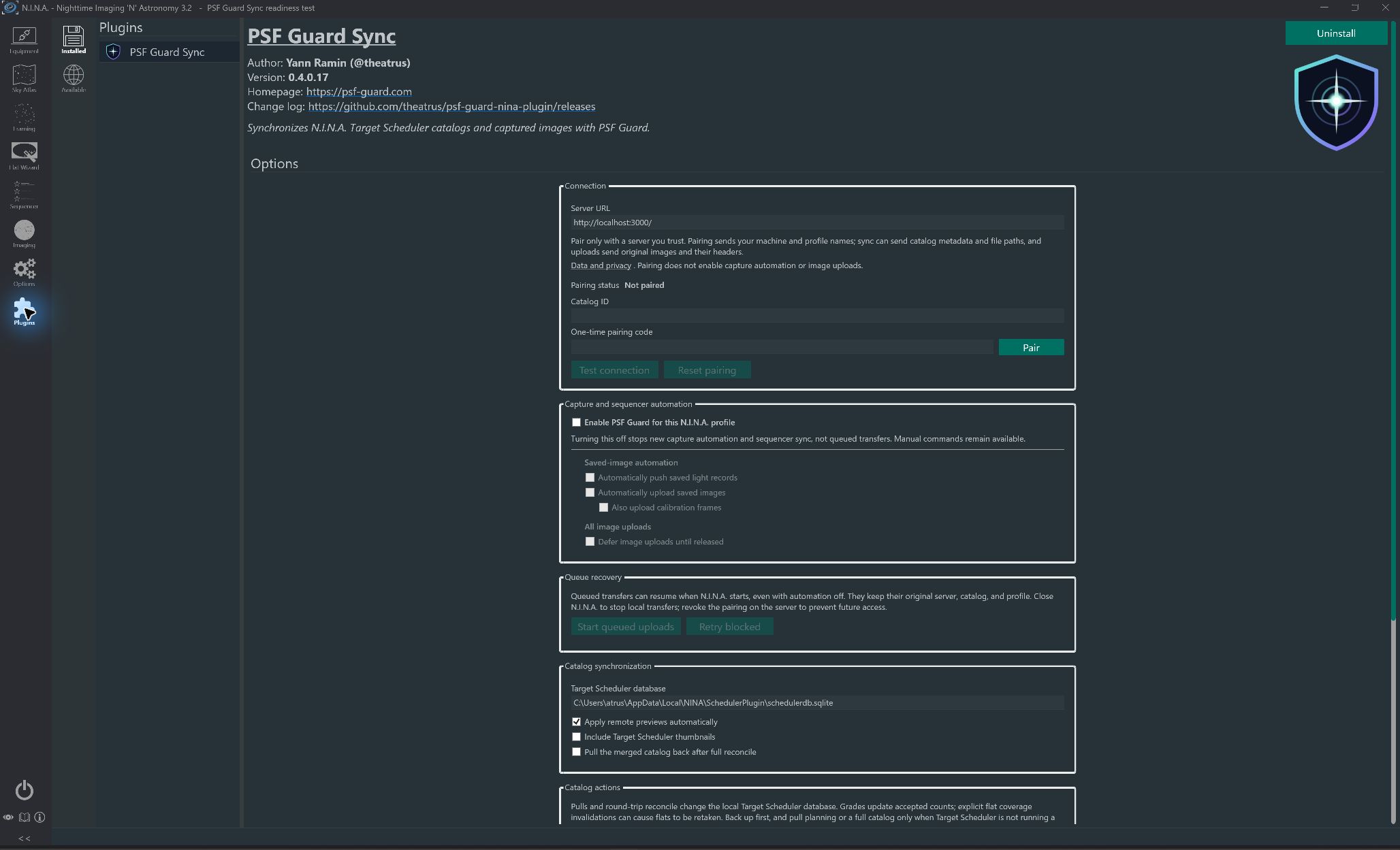
- In N.I.N.A., open Plugins → Installed → PSF Guard Sync. Enter the Server URL, paste the code into One-time pairing code, and click Pair. The server returns the catalog ID, shown under Catalog ID, and a credential for this N.I.N.A. profile.
- Click Test connection, then choose what to upload and sync.
A remote server needs an https:// URL. Plain
http:// works only for a loopback address such as
http://127.0.0.1:3000.
A pairing code works once and expires after an hour. Each pairing makes its own catalog-scoped credential: the server keeps only its digest, and the plugin keeps it in Windows Credential Manager and never shows it. A pairing belongs to one N.I.N.A. profile and one server URL; change either and pair again. Pairing turns on scheduler sync for the catalog. It does not turn on image uploads or choose the receive directory.
Paired clients, in the same editor, lists each paired profile by machine and profile name. Revoke cuts off one and leaves the others alone.
Recover a lost pairing
Pairing status reads Paired when the profile is ready. Two other states need a new code:
- Credential missing; pair with a new code: someone removed the credential from Windows Credential Manager. Generate a new code in PSF Guard, since a used code never works again, and click Pair.
- Server changed; pair again: the Server URL no longer matches the paired server. Pair with a code from the server now entered.
Reset pairing clears this profile's credential and catalog. It keeps the server URL, the other settings and the queued jobs. Pairing again with the same catalog restores its queue; click Retry blocked to resume blocked jobs. Pairing with another catalog does not move the old catalog's jobs to it. Pair stays clickable while no manual operation runs; a missing code or a bad URL shows an error in the status area.
Use a manual API key
The plugin only pairs; it has no field for a manual key. A manual key serves other clients, such as another PSF Guard:
- Edit the catalog and click Generate beside Remote API key. Copy the key now: it is not shown again after saving.
- Tick Accept remote scheduler sync, and Accept remote image uploads to receive files. Save the catalog.
- Give the client the server URL and the key. If it asks for the catalog
ID, copy it from the database list or its
?db=URL.
A new manual key replaces only the previous manual key. Paired clients keep working, and revoking a paired client leaves the manual key alone.
How the plugin works
The plugin listens for N.I.N.A.'s image-saved events and has two capture
paths. Direct image mode queues the saved FITS or XISF file for upload.
Target Scheduler mode waits for the matching acquiredimage row,
then queues a bundle with the capture metadata, project, target and plan.
Network work runs in the background and never holds up N.I.N.A.'s image
save. If the server is offline, the plugin keeps the queue and retries
later.
- Direct uploads need no Target Scheduler. Lights, bias, darks, dark-flats and flats upload as FITS or XISF. Calibration frames go to the PSF Guard calibration library and never become Target Scheduler rows.
- Catalog pushes follow each light. Once Target Scheduler records a light, the plugin queues it with the scheduler metadata PSF Guard needs to rebuild the plan. If another plugin or a path alias changed the saved path, the plugin accepts only a single row with the same file name and exposure start.
- The row goes before the file. With scheduler pushes and image uploads both on, each light is one job: the plugin applies the scheduler row, then uploads the file, so PSF Guard never makes a second row for it. This needs Apply remote previews automatically.
- The queue survives restarts. Queued jobs live under
%LOCALAPPDATA%\NINA\PsfGuardSync. Each keeps the server, catalog and credential reference it started with, never the credential itself. A retry with the same file name and hash does not add a second catalog entry. - Failed jobs retry or stop. Network and server errors retry with growing delays. Authentication, catalog and payload errors stop the job as blocked; fix the cause and click Retry blocked.
- Large previews run in the background. The server builds a catalog preview as a job, and the plugin polls the job until the preview is ready, so a reverse proxy never times out.
- Transfers go both ways. Merge, push plans and push grades on demand, and pull plans, grades or the whole merged catalog back into Target Scheduler.
- Frames match by GUID. PSF Guard updates parent IDs for
projects, targets, templates and plans and keeps the telescope's capture
counts. Pulling grades changes only
gradingStatusandrejectreasonon acquired images, then recounts the accepted frames of each plan it touched. - Removed rejects stay out. A push, reconcile or upload never brings back a frame removed in PSF Guard. Target Scheduler keeps its own row.
- Thumbnails are optional. Include Target Scheduler thumbnails sends Target Scheduler's thumbnails with the capture data. A reconcile refuses more than 256 MiB of them.
- Pulls are checked. PSF Guard sends the SHA-256 of each
response body in an
X-Content-SHA256header, and the plugin checks it before changing Target Scheduler.
What the server does with an upload
- It writes the file to a temporary name, checks its SHA-256 and headers, and publishes it without overwriting anything.
- A light joins an existing target by name or coordinates, as a folder import does, or the row scheduler sync already made for it. A light with no match builds its project, target, template and plan from its headers.
- Analyze new frames as they arrive, a per-database option beside the quality backfill buttons, scores uploaded and synced frames in the background. See Quality Screening.
- With Rebuild stack previews on their own on, new frames queue a stack refresh. See Storage & Performance.
keep_failed_uploads = truein the server's[server]config keeps a refused upload's staged file, and the log gives its path, so you can see what the client sent.
Review staged catalog changes
Each catalog push makes a preview on the server before anything changes. Settings → Sync → Staged previews lists them, including those from remote N.I.N.A. installations, with the catalog, operation, source, change counts and expiry. Expand What would change for the field changes and grade transitions, up to 400 lines.
- Apply writes the changes to the destination.
- Refresh compares the bundle with the destination again, after the destination changed.
- Discard deletes the preview and changes nothing.
Configure the plugin
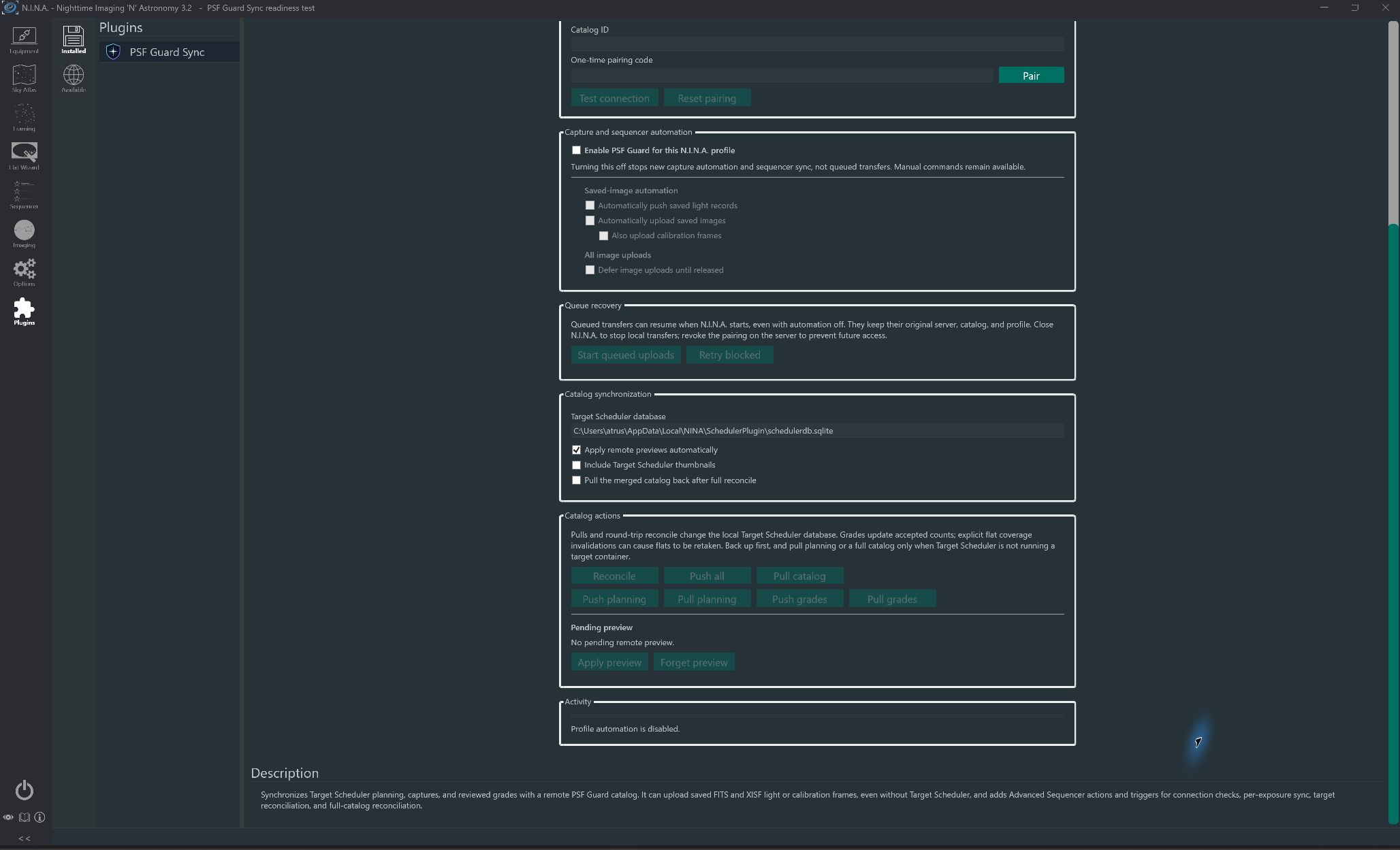
After pairing, set the rest in Plugins → Installed → PSF Guard Sync. Settings belong to the active N.I.N.A. profile, and every capture automation option starts off.
- Tick Enable PSF Guard for this N.I.N.A. profile. Automatic work and the sequencer instructions need it.
- Under Saved-image automation, choose any of Automatically push saved light records, Automatically upload saved images for lights, and, below it, Also upload calibration frames for bias, darks, dark-flats and flats.
- Set the Target Scheduler database. The default is
%LOCALAPPDATA%\NINA\SchedulerPlugin\schedulerdb.sqlite. - Leave Apply remote previews automatically on to apply each catalog preview at once, or turn it off to review previews in PSF Guard. Sequencer reconciliation always applies its preview.
- Tick Include Target Scheduler thumbnails to send thumbnails. Tick Pull the merged catalog back after full reconcile to download the merged catalog, without thumbnails, after PSF Guard applies a full reconcile, and merge it into Target Scheduler.
Click Test connection before turning on automatic work. It checks the server URL, the stored credential and the catalog. With automatic image upload on, it also checks that the catalog accepts uploads.
Pairing does not enable capture automation. Turning off the profile's enable switch stops new automatic work and sequencer sync, but queued transfers can resume when N.I.N.A. starts. To stop local transfers, close N.I.N.A.; to block the paired client's access, revoke its pairing in PSF Guard. Manual commands remain available while profile automation is off.
Hold image uploads
Defer image uploads until released stores each image upload without sending it. Target Scheduler records still sync at once. To send the held uploads for this profile's server and catalog, click Start queued uploads, or run Start PSF Guard uploads at the end of a target or session. The release covers uploads queued before it and does not wait for them to finish; later captures wait for the next release. Keep each FITS or XISF file at its path until its upload finishes.
Run catalog actions by hand
- Reconcile sends a full Target Scheduler snapshot, waits for PSF Guard's preview, and applies it when automatic apply is on. The status area reports each stage.
- Push all queues the same full merge in the background queue.
- Pull catalog merges PSF Guard's catalog into Target Scheduler.
- Push planning and Push grades queue one kind of data for PSF Guard. Pull planning and Pull grades apply it to Target Scheduler.
- With automatic apply off, Pending preview shows the preview a manual reconcile left. Apply preview applies it; Forget preview drops it here and lets PSF Guard expire it.
Back up the Target Scheduler database before your first pull. Pulling the full catalog can change capture records as well as plans and grades.
Use the sequencer instructions
The plugin adds a PSF Guard Sync category to N.I.N.A.'s advanced sequencer. Every item needs Enable PSF Guard for this N.I.N.A. profile and a paired profile. All but Check PSF Guard connection, Start PSF Guard uploads and PSF Guard image upload also need a Target Scheduler database.
| Instruction | What it does |
|---|---|
| Check PSF Guard connection | Checks the server URL, credential and catalog. Place it near the start; an offline server triggers the instruction's error handling. |
| Start PSF Guard uploads | Releases held image uploads and reports how many, without waiting for them. Place it at the end of a target or session. |
| Pull PSF Guard planning | Pulls projects, targets, templates and exposure plans into Target Scheduler. Run it before a Target Scheduler container starts, since a running container may not reload plans from disk. |
| Push PSF Guard planning | Sends Target Scheduler's projects, targets, templates and plans, and waits for the preview or its apply. |
| Pull PSF Guard grades | Pulls reviewed grades and reject reasons, matched by image GUID, and recounts accepted frames per plan. It also syncs flat coverage; see below. |
| Push PSF Guard grades | Sends reviewed Target Scheduler grades and reject reasons, and waits for the preview or its apply. |
| Reconcile PSF Guard catalog | Uploads a full Target Scheduler snapshot, waits for the preview, and applies it even when automatic apply is off. Use it at the end of a session. With pull-back on, it then pulls the merged catalog back. |
| Reconcile current target with PSF Guard | Reconciles the current target's project, plans, captures and optional thumbnails. Place it near the end of the target's container. The plugin refuses a name that matches more than one Target Scheduler target, ignoring case. |
| Trigger | What it does |
|---|---|
| PSF Guard target sync | Reconciles the current target after a set number of completed light exposures. The count restarts when the target changes. |
| PSF Guard exposure sync | Waits for the save and the Target Scheduler row, then pushes that one capture and its parent records. Its Upload image switch then uploads the file, or holds it when uploads are deferred. |
| PSF Guard image upload | Waits for the save, then uploads the light or calibration frame, or holds it when uploads are deferred. Its Upload lights and Calibration switches save with the sequence, so it works without profile-wide uploads or Target Scheduler. A file a profile-wide upload already queued is not sent twice. |
Reconcile instructions and PSF Guard target sync wait two seconds for Target Scheduler's last write, take one read-only snapshot, and wait until the server applies the preview, even with automatic apply off. Per-capture pushes from Automatically push saved light records carry on in the background queue and retry on errors; turn that setting off when a trigger should be the only catalog sync. To sync and upload the same light from a sequence, use PSF Guard exposure sync with Upload image, not two separate triggers, so the row reaches PSF Guard before the file.
Sync Target Scheduler flat coverage
Pull grades, Pull PSF Guard grades and every applied reconcile send Target Scheduler's flat history to the paired catalog. They also remove the coverage rows you invalidated in PSF Guard:
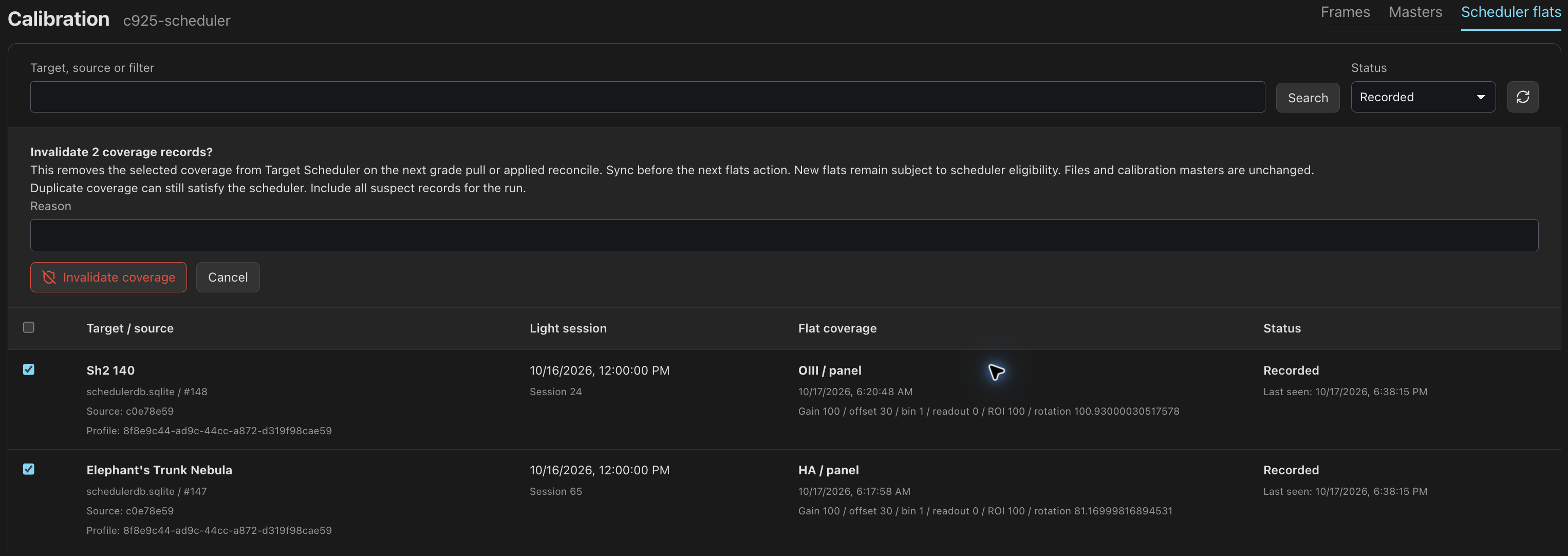
- In PSF Guard, open the Calibration page from the header, or Open Calibration under the catalog in Settings → Databases, and choose Scheduler flats.
- Select the suspect coverage records, enter a Reason, and click Invalidate coverage. It needs an editor.
- Run Pull PSF Guard grades before the next Target Scheduler flats instruction. Target Scheduler then sees those flats as missing and can take them again under its usual rules.
- A preview-only reconcile does not apply invalidations.
- Records are coverage, not files. Select every matching record, duplicates included; a record left behind can still satisfy Target Scheduler.
- Invalidating never deletes or rejects a FITS or XISF file or a master.
- The plugin deletes only rows unchanged since the snapshot. A changed row stays and shows as Changed in NINA.
- The plugin keeps an origin ID per scheduler database path under
%LOCALAPPDATA%\NINA\PsfGuardSync\flat-history-origins. A new database path starts a new origin, and old decisions do not apply to it.
Recover refused uploads
PSF Guard refuses uploads for a deleted project or a removed reject and explains how to recover. A plugin version with this support holds the upload without retrying; older versions show a blocked job. Another capture that shares the same file name can still upload.
- In PSF Guard, allow the deleted project back or restore the rejected frame.
- In the plugin settings, choose Retry refused uploads.
To stop trying to upload those files, choose Forget refused uploads. This removes the held queue entries; image files stay on disk. Sending project deletions to the rig also needs a plugin version with project deletion support.
Fix common problems
| Result | Check |
|---|---|
| Pairing code is unknown, expired, or already used | Generate a new code on the destination catalog. A code works once, for one hour. |
| Pair reports an error | Enter the code and a full server URL. A remote server needs https://; http:// works only for loopback. |
| Credential missing; pair with a new code | The credential left Windows Credential Manager. Pair with a new code, then click Retry blocked. See Recover a lost pairing. |
| 401 or “Bearer token required” | The plugin has no saved credential, or its client was revoked. Pair with a new code and run Test connection. |
| 403 invalid key or wrong catalog | Credentials belong to one catalog. Click Reset pairing and pair with a code from the intended catalog. |
| 403 scheduler sync disabled | Tick Accept remote scheduler sync on that catalog. Upload permission alone does not grant catalog sync. |
| Image upload unavailable | Tick Accept remote image uploads and choose a Receive directory. Pairing does not turn uploads on. |
404 under /api/sync/v1 | Upgrade PSF Guard to 0.9.0 or newer. For a preview, a 404 can also mean its 30 minutes ran out or it was already applied. |
| “Flat coverage was not synced” | Upgrade PSF Guard to 0.9.6 or newer. Catalog sync still works. |
| Reconcile refuses the thumbnails | They pass 256 MiB. Turn off Include Target Scheduler thumbnails, or reconcile one target. |
| Current-target reconcile refuses the target | Target Scheduler has more than one target with that name. Give each a unique name. |
| Large preview times out at a proxy | Upgrade the plugin and server, so the plugin starts a background preview job and polls it. |
| “Bundle digest is missing or invalid” | Upgrade both, so pulls check the raw response against X-Content-SHA256 instead of re-serializing the JSON. |
| Queued work does not drain | Run Test connection, check that N.I.N.A. reaches the server URL, and leave the plugin running. Blocked jobs wait for Retry blocked; held uploads wait for Start queued uploads. |