Stacks
Stack a project's graded frames on the server and check the result before full processing. This page covers the Stacks view, the stacking method, calibration, the build line, processing runs, automatic refresh, signal-to-noise by depth, and color previews.
Open Stacks
Stacks sits beside Images and Sequence in the header. It stacks every frame of the project chosen in the header, or of one target when a target is chosen. Each project row in the Library has a Stacks button too; a project with one target opens at that target.
To stack a hand-picked set, select two or more images in Images and click Stack selected. Stacks opens with that set. Stack every image instead goes back to the whole project.
Card size, at the top of the view, sets how wide the stack and color cards are, from 300 to 1600 px. By default the cards fill the row: one to a row, or two on a wide screen. A size you choose stays in this browser and in the page address; Fit goes back to filling the row.
Click the panel's Stacks title to fold the whole panel. A collapsed panel shows the channel count, or that a build is running.
Build stacks
Click Build stacks. PSF Guard queues one build per target and filter, registers the frames with Seiza, and integrates them. It never mixes targets or filters. A channel already built from the same frames and settings reuses its saved result. A channel with fewer than two frames is skipped. Build on one card builds that channel alone.
The jobs list shows Preparing stack build immediately, and the button shows Preparing…. Within each catalog, PSF Guard prepares requests in the order received: it reads and scores the frames, then matches calibration data. Each calibration file's header is read once per request, while other catalog requests can continue. Once preparation finishes, the panel and jobs list show the channel builds, including matching builds already queued, running or complete.
You can stop preparation before channel builds are queued. A preparation failure shows the reason. If the server restarts during preparation, the request returns to its place in the queue and PSF Guard prepares it again.
Once the project has stacks, the button reads Build current set, and Rebuild current set builds every channel again even when nothing changed. Each card keeps its channel's last good stack. Rebuilding one channel leaves the others alone, and a failed build never replaces a good one.
What goes in:
- Accepted frames, and Pending frames unless Accepted only is ticked.
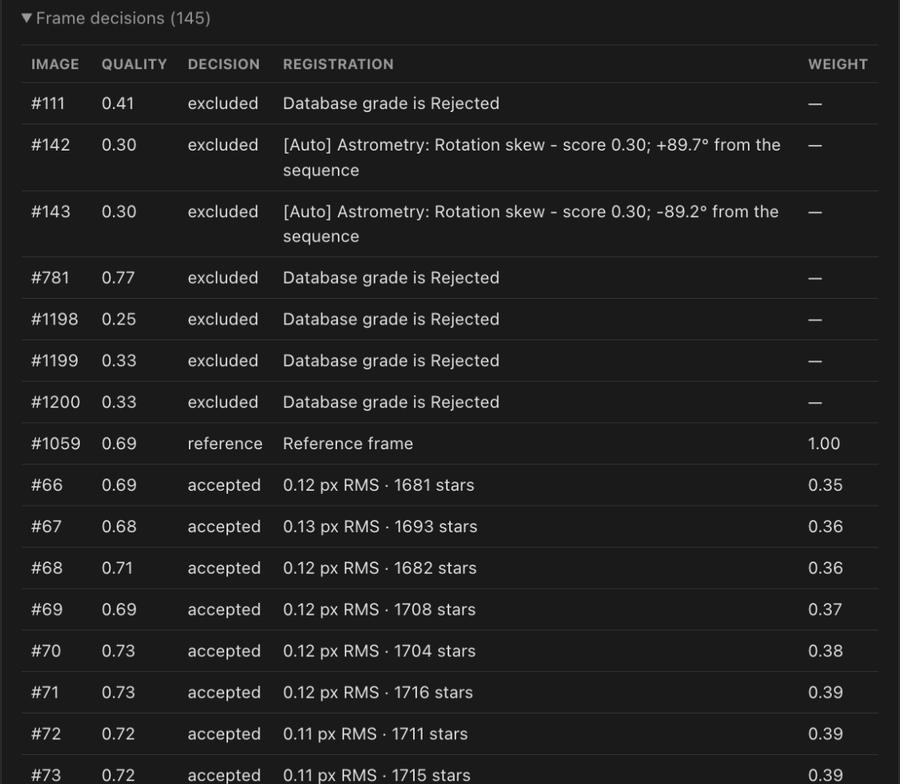
- Never Rejected frames. Never frames that sequence analysis recommends for rejection, such as cloud, obstruction, off-target pointing, lost tracking, stars far softer than the target's best, or a rotator that slipped. See Quality Screening.
- Lights the calibration library can't calibrate, only when Leave out lights that can't be calibrated is on under Settings → Calibration → Stacks and exports. The card counts them under can't calibrate. See Calibration Libraries.
Sequence analysis scores frames with your defaults from Settings → Review → Sequence scoring. When Sequence's Scoring was changed for this project, Scoring (changed) beside the build buttons says that builds use the changed values, with Reset to default.
The server log lists each frame a build leaves out or Seiza rejects, and why. The desktop app writes this log to a daily file; Open logs in Settings opens the folder.
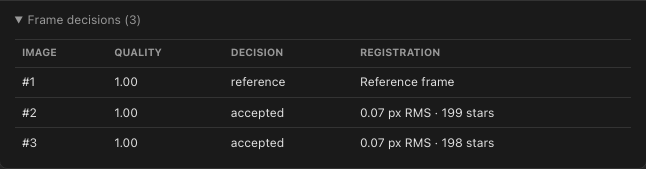
Expand Frame decisions on a card to audit the build: each frame's quality score and decision, and for admitted frames the matched stars, registration RMS, drift, overlap and weight. Excluded and rejected frames keep their reason.
Separate exposure lengths
Separate exposure groups, at the top of Stacks and in Images, is on by default. Frames of 120 s and 300 s build separate stacks instead of dimming each other. Within one target and filter, a new group starts when an exposure is at least twice the shortest in the current group, so 10, 10.1 and 19 s stack together while 30 s and 300 s each start another. Frames with no recorded exposure form Unknown exposure.
Turn it off to mix lengths in one stack. The choice is saved per project in that database, and a project that chose either way keeps its choice. Changing it needs an editor. It changes stacking and grid grouping, not grades or Target Scheduler plans.
Choose the stacking method
Settings → Stacking → Stacking method sets how every stack on the server integrates its frames. Three presets fill in the choices below; each choice can also be changed on its own.
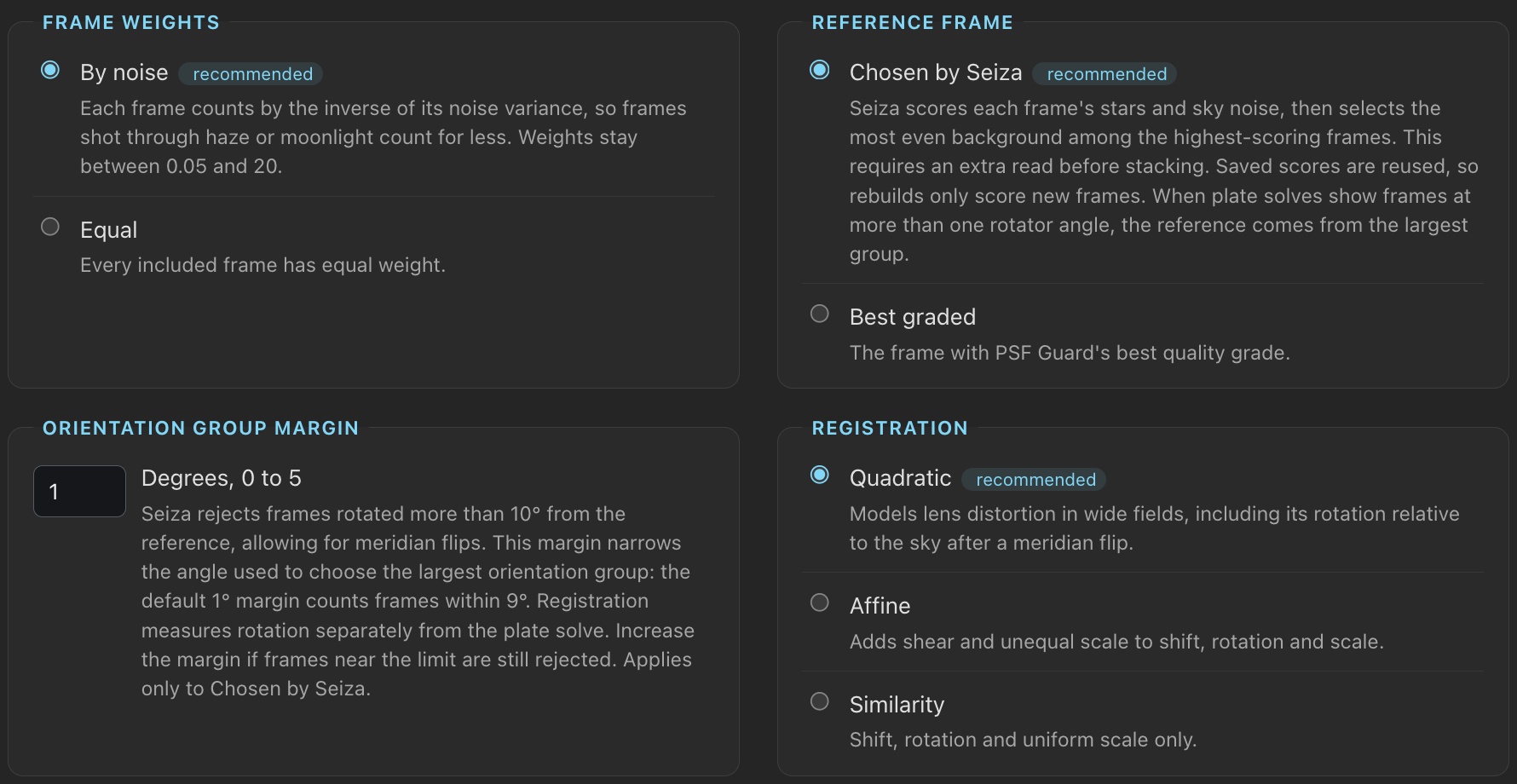
- Recommended, the default, follows the Seiza stacking command line's defaults: local background normalization, frames weighted by their noise, a reference chosen from each frame's stars and sky, quadratic registration for lens distortion, and Lanczos-3 resampling.
- Draft is Recommended without the final rejection pass, for a quick look.
- Classic is what PSF Guard did before the method could be chosen.
| Choice | Recommended | Classic | Also offered |
|---|---|---|---|
| Final pass | Reintegrate | Reintegrate | Draft |
| Normalization | Local background | Global | Local |
| Frame weights | By noise | Equal | |
| Reference frame | Chosen by Seiza | Best graded | |
| Registration | Quadratic | Similarity | Affine |
| Resampling | Lanczos-3 | Bilinear | |
| Bayer drizzle | Off | Off | On |
- Final pass. Reintegrate reads every admitted frame again and rejects outliers against all the others, so a satellite trail in the reference or an early frame goes too. Draft publishes the live stack as it stands: much faster, but such a trail can stay.
- Normalization. Local background keeps one gain per frame, measured from star photometry, and matches each 256-pixel tile's background to the reference, so frames with different sky gradients leave no seams at their edges. Global fits one gain and one offset per frame. Local fits a gain per tile, which a tile of cloud or nebula can push far enough to reject the frame.
- Frame weights. By noise lets quieter frames count for
more. A frame's weight is
(reference noise / frame noise)², clamped to 0.05–20, so a frame twice as noisy as the reference weighs 0.25. A weighted card adds a Weight column to Frame decisions; hover a weight to see the noise behind it. - Reference frame. Chosen by Seiza scores each frame by its brightest unsaturated stars against its sky noise, then takes the flattest sky among frames within 70% of the best. Scores are cached, so a rebuild reads only new frames. Best graded uses PSF Guard's quality grade.
- Orientation group margin. With Chosen by Seiza, PSF Guard uses plate solves, or header WCS when needed, to find the largest group within Seiza’s 10° rotation limit, allowing for meridian flips. Seiza chooses a reference from that group. The margin narrows the angle used to count frames: the default 1° counts frames within 9°. Set 0° to 5°. Increase it if registration still rejects frames near the limit. This setting does not affect Best graded. Existing stacks keep their reference until frames change or you click Rebuild; changing the margin marks affected stacks out of date.
- Registration. Quadratic follows a wide field's lens distortion. A frame with too few paired stars keeps the similarity fit.
- Resampling. Lanczos-3 gives sharper stars and clamps ringing at edges that stand above the noise. Faint sky is left unclamped, so frames rotated slightly against each other leave no cross-hatch, and the stack's noise is the sky's own. Bilinear is faster.
- Bayer drizzle. For color cameras. Each registered pixel takes only the nearest photosite of its own color, so nothing is interpolated. It pays only when frames are dithered by several pixels; with little movement it lowers SNR. A drizzled stack skips the final pass.
The stack panel shows the method in use beside Method:; click it to open Settings. A change applies to the next build, automatic refreshes included. Cards built another way read Out of date — stacking method changed, and cards from before the method could be chosen read Out of date — built before the stacking method could be chosen. Both stay visible until rebuilt.
A build runs Seiza, masters included, on the cores it was given: the share for work you wait on, or the background share for an automatic refresh. Within a channel it prepares several frames at once while it integrates earlier ones. See Processor use.
Final rejection pass and scratch space
The final Rejecting transients pass reads each frame once
and integrates it in sections to use less memory. Temporary files under
stack-scratch in the stack folder need four bytes per sample per
frame and are removed when the pass ends. Progress shows reading and integrating.
If scratch space is unavailable, PSF Guard reads each frame three times instead.
Keep stacks through engine updates
A Seiza update keeps completed stacks, checkpoints and calibration masters when its calculated output is unchanged. Build current set reuses them. Changes to stacking output still rebuild affected channels and masters when needed.
When an engine update changes only the display stretch, Build current set or automatic refresh renders the card preview again from the saved FITS. The card and job list show Waiting to render preview, then Rendering preview. The stack stays ready, with its processing, FITS and source-frame searches available.
A stopped refresh keeps the completed stack. A failed refresh keeps the old preview and shows the error on the card; it does not retry at the same stretch output version unless you rebuild the stack. Color combinations and WBPP previews keep their previous stretch until you create them again.
The new resampling removes cross-hatched bands from stacks of frames rotated slightly between nights. Reported SNR on a faint sky may be about a tenth lower because it measures the sky's real noise; the old resampling smoothed that noise without gaining signal.
On the command line, psf-guard stack-snr --weight-by-noise
applies the same noise weights; see below.
Each stack rebuilds once when next opened or refreshed. Color previews using deconvolution or RC-Astro also become out of date; rebuild them for the corrected processing order and orientation. If a channel card still shows an upside-down RC-Astro result, apply its processing again.
Calibrate each channel
Stacks match each light against the catalog's calibration library and build bias, dark, dark-flat and flat masters as needed. The panel's Calibration control picks how the next build calibrates:
| Mode | What it does |
|---|---|
| Auto | Default. Applies the safe masters. Holds back a flat that has no bias or dark master unless the pedestal can be fitted from the lights. |
| Force on | Applies every master that can be built, including those Auto holds back. The card warns what to expect. |
| Off | Stacks the raw frames. |
The project-wide choice is saved. Each card has its own select that overrides it for that channel; Project follows the panel. A stack built under another mode shows as out of date.
Settings → Calibration sets the rules every stack matches by: the matching tolerances, the dark-master choices such as Dark choice, and the light checks, for every rig or, under Rigs, for one. With Leave out lights that can't be calibrated on, under Stacks and exports, a build leaves out the lights a check flags for a missing flat, bias or dark, or flats past the age limit. See Dark masters and Lights that can't be calibrated.
Flats follow the rig's flat groups: PSF Guard matches each light to flats from the same side of every measured change in the rig's flats, as the Calibration page's Frames view shows them, and nights whose flats differ stay out of one master. A light's Calibration panel in image detail explains how its flats were chosen. See Flat groups.
A multi-night stack whose lights need different flats or darks splits into calibration sessions, and the build swaps masters between them. A master that fails to build does not fail the stack: the card shows the skipped master and why, and the build goes on with the rest.
While masters build, the card and the header queue show which master, what Seiza is doing with it, and the frame or tile under way, for example Master dark · integrating frame 4/20. The bar moves with it. Stop ends a master build part way, and a master stopped part way writes nothing.
Masters on a finished stack opens the bias, dark, dark-flat and flat files that stack used, with the sessions and channels that used each, fitted pedestals, the sensor temperatures and nights of each master's frames, pan and zoom, a display stretch, and an unchanged FITS download. Open in Calibration in that inspector opens the master on the Calibration page, while the library still records it. Matching rules, flats-only pedestals and master caching are on Calibration Libraries.
When grading leaves fewer than two usable frames, the channel card stops showing its old stack and color compositions stop offering that stack as a source. Missing files or missing calibration alone do not remove it.
Queue builds
Queued builds read frames, grades and calibration again when they start, so they use changes made while waiting. Artifact searches share the stack queue and run before automatic work.
Build buttons stay available while a build runs. Each click queues another
build. New builds you start join ahead of automatic builds. Stack builds and channel-processing
runs share one worker across databases. Short
color compositions can run alongside it. Cards show queued or
live progress.
Stop appears while a build is queued or running. When several builds are waiting, Stop all shows their count. The build stops between frames, channels, or master input frames. Nothing partial is published: a channel stopped before its FITS is written leaves no stack, and channels already finished keep theirs.
A build belongs to the server, not to the page that started it. Leave the page or
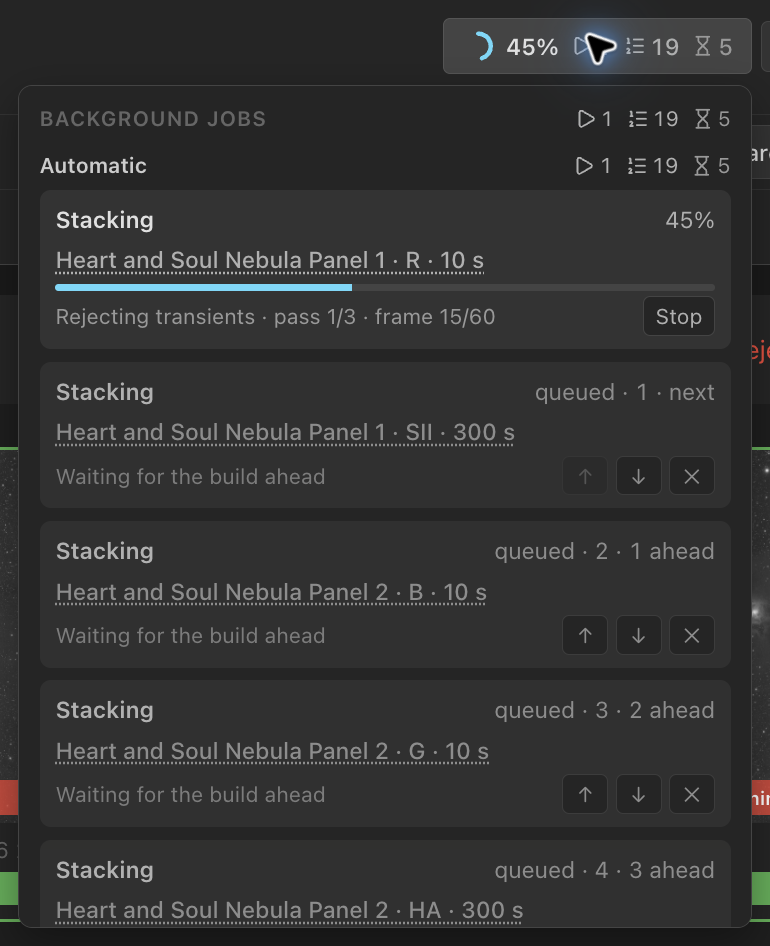
reload it and the cards pick up the running build. The header's background jobs chip
shows overall progress and a count of running, queued and waiting jobs; hover or click
it to see the list. Builds you started sit under Started by you,
automatic refreshes under Automatic. Both share one build line, so a
queued build shows its position in the queue and the number of jobs ahead, as
queued · 4 · 3 ahead. ↑ and ↓ move a
queued build one place. Under Started by you,
Move to top moves a task to the front, including past
automatic builds; it runs after the current task finishes. The button is
disabled when the task is already next. × removes a queued
task, and Stop ends the running task after asking once.
Click a build's target to open its stacks.
Progress keeps moving through the final rejection pass, for example Rejecting
transients · pass 2/3 · frame 4/14.
A running color composition also has Stop. It stops at the
next channel or step and ends a running RC-Astro tool immediately. Completed tool
steps stay cached. The job row shows the current channel, tool and progress, such
as H-alpha: BlurXTerminator (42%).
The build queue survives a restart, including requests still being prepared. Queued and running builds and processing runs return in order. A server stop lets a running build checkpoint the frames it has integrated, and the build resumes after the restart. See Storage & Performance for how the server stops, the job journal, and the share of processor cores each kind of work gets.
Add frames without restacking
A finished or stopped build saves a checkpoint. A later build of the same
channel whose frames only grew reopens it and registers just the new
frames; the frame counter marks the restored ones resumed. The
result is the same as a build from scratch.
The checkpoint is reused only when every earlier frame is still there,
unchanged, and the calibration, Accepted-only policy, scoring, stacking
method, frame order and pipeline version all match. Otherwise the card says
why, for example Full restack: the scoring policy changed, and
the old checkpoint is deleted as the restack starts. A checkpoint no build
has written or resumed from for 30 days is deleted; the stack it led to
stays. See Disk use.
Keep stacks current on their own
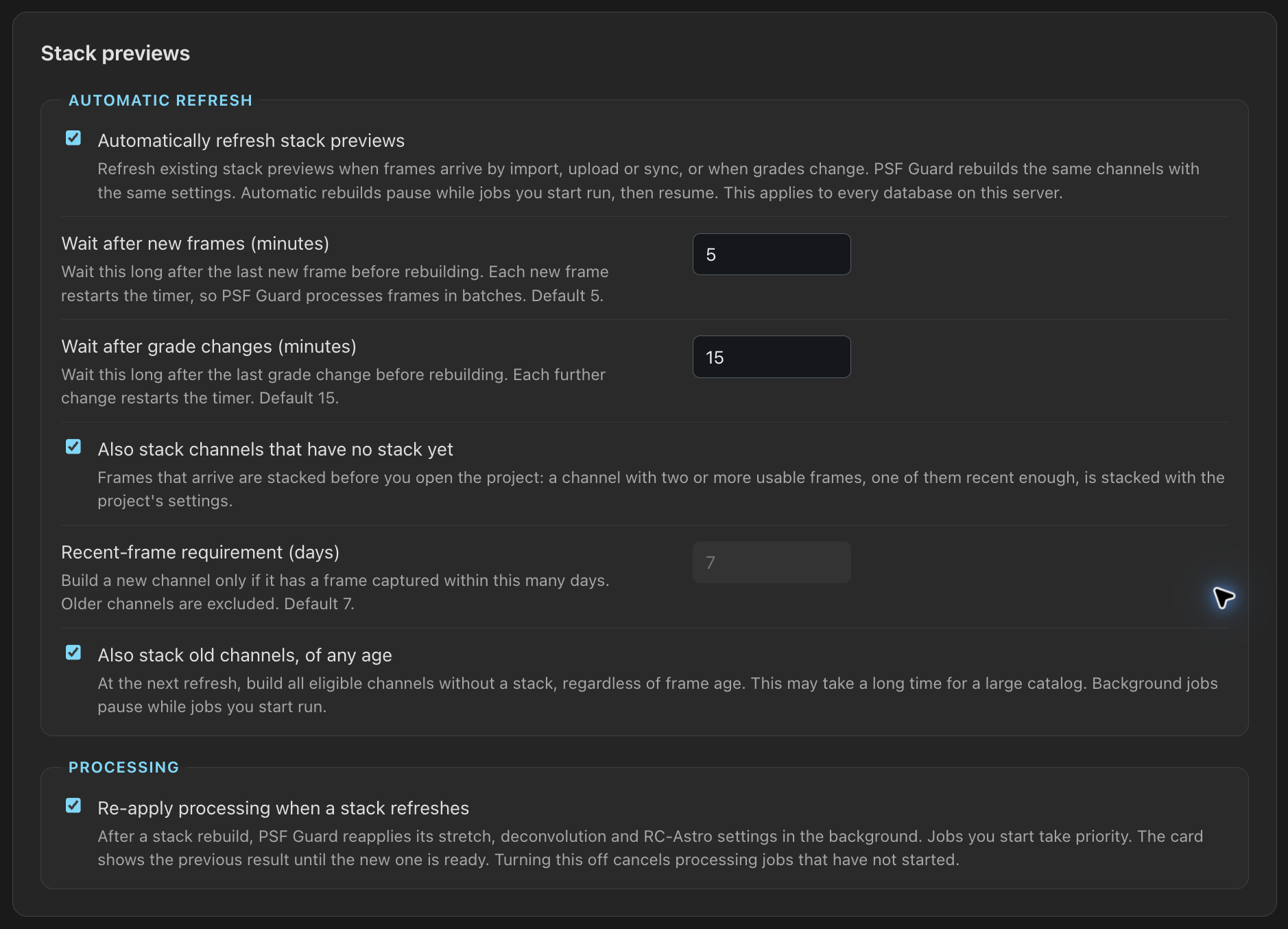
Turn on Rebuild stack previews on their own under Settings → Stacking → Stack previews. It is off by default and covers every database on the server. A project whose stacks were built once then restacks the channels whose frames or grades changed, one build per channel, with the same settings. Other channels are left alone.
| Setting | Default | Effect |
|---|---|---|
| Wait after new frames (minutes) | 5 | New frames from an import, upload, sync or quality scan settle this long. Each arrival pushes the refresh out again, up to four delays. |
| Wait after grade changes (minutes) | 15 | Grading waits longer, since it is interactive. Each change pushes the refresh out again, up to four delays. |
| Also stack channels that have no stack yet | Off | Stacks a channel with two or more usable frames before anyone opens the project. |
| A new channel needs a frame from the last (days) | 7 | Leaves older channels alone, so turning the option on does not stack a whole catalog. |
| Also stack old channels, of any age | Off | Drops the day limit. On a large catalog this keeps the stacker busy for a long time. |
Automatic builds use the background share of the processor and step aside when you start a build, a color composition, a stretch or an artifact search. A refresh still settling stays out of the header's background jobs. Once due, it starts when the stacker is free and nothing you started has run for 30 seconds. While your work, another build or a quality analysis of its database holds it back, the header lists it under Automatic as Refreshing stacks, waiting, with what it waits for and how many channels it will stack.
A build you start pauses a running automatic build, which returns to the queue behind your work. It resumes from its checkpoint when your builds finish. If frames or grades changed, PSF Guard rebuilds the affected results. The header lists queued automatic builds under Automatic. An automatic build you stop yourself stays stopped. A refresh never changes grades, files or the calibration library. A refreshed stack gets its card's processing again; see Re-apply processing.
Measure signal-to-noise by depth
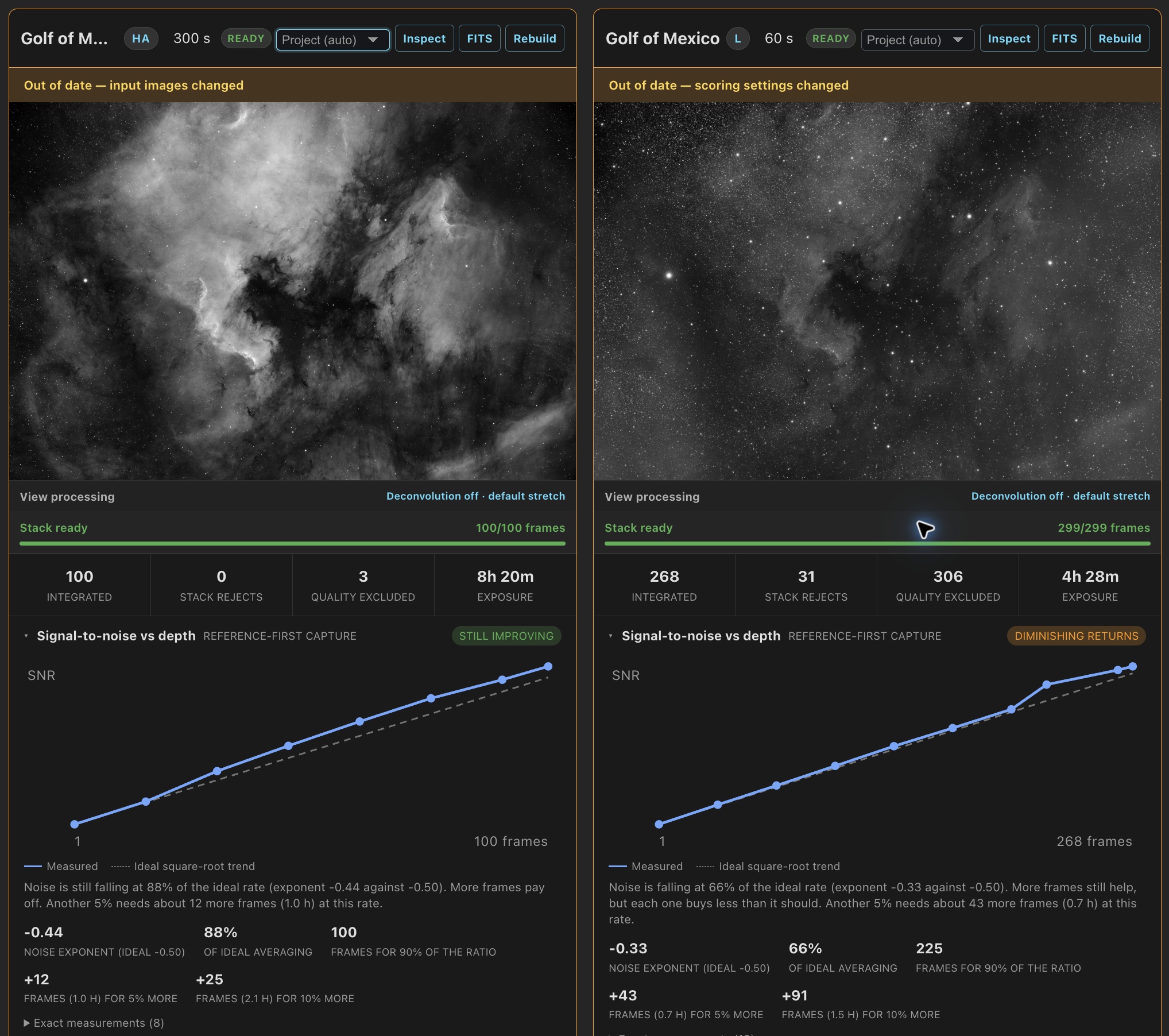
Each build measures how its signal-to-noise ratio grows with depth, at 1, 2, 4, 8 frames and so on, plus the full set. The solid line is the measurement. When every frame has the same known exposure, a dashed line shows ideal averaging, where noise falls as the square root of the frame count. With mixed or missing exposure lengths, the card shows only the measured curve.
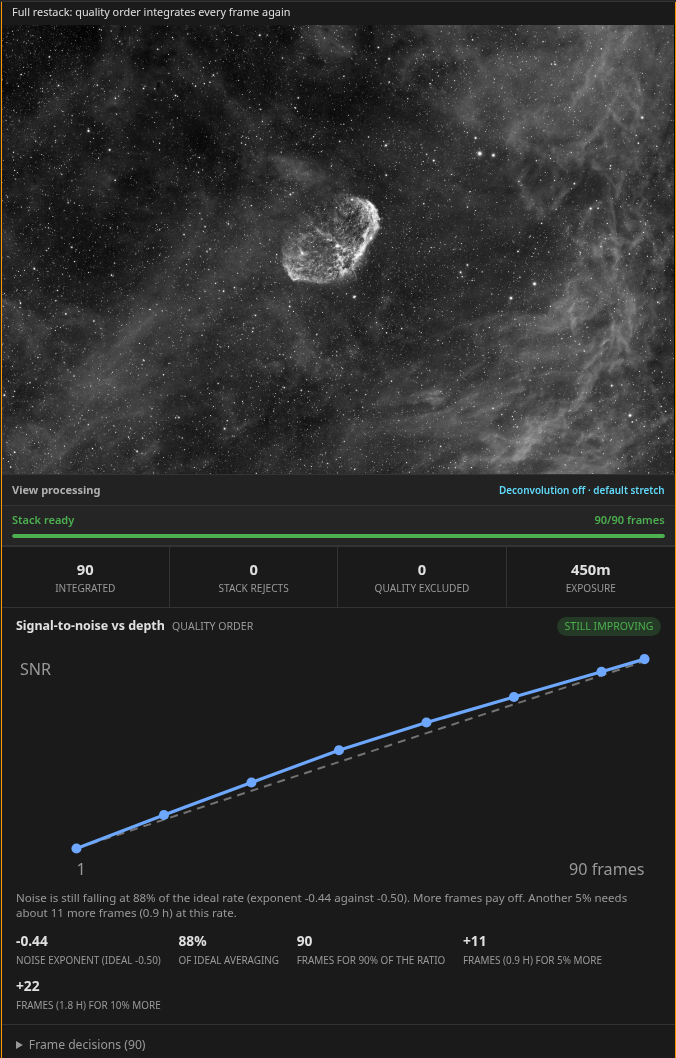
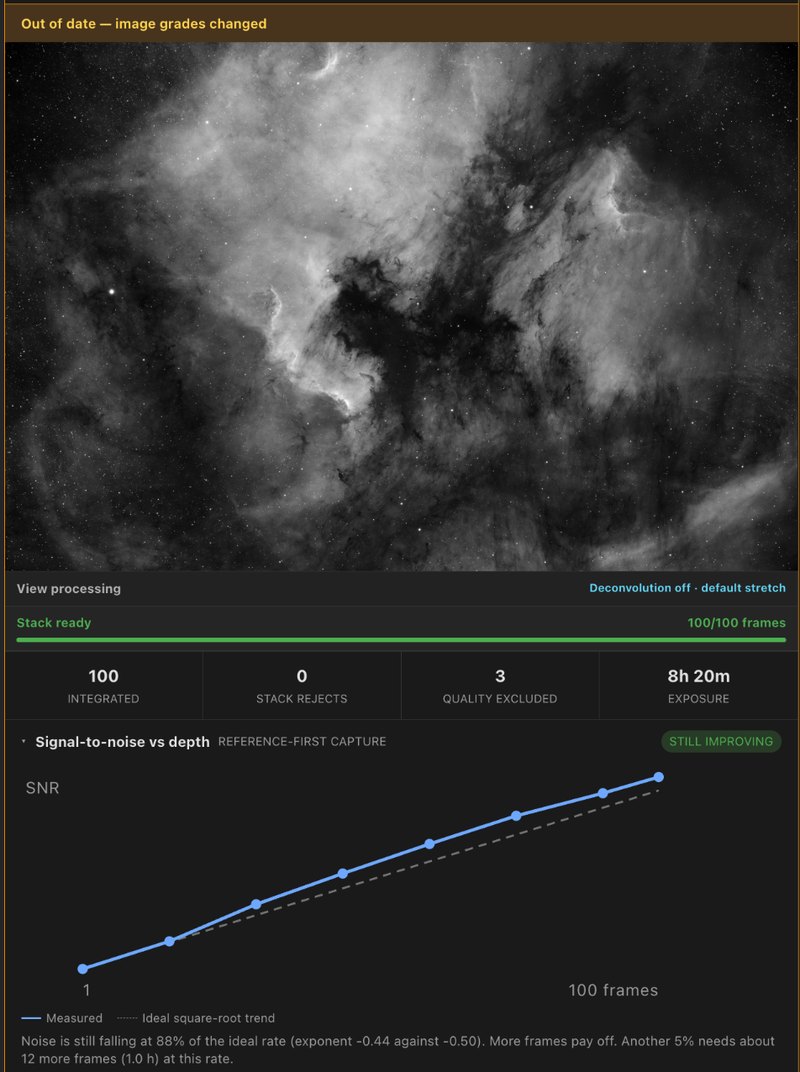
The Order control sets which question the curve answers:
- Capture sequence, the default, starts from the registration reference and adds the other frames in capture order. Use it to judge whether more nights of the same data will help.
- Quality adds the best-graded frames first. The depth where the curve leaves the ideal is where weaker frames stop paying for themselves. A quality build always restacks every frame and never resumes.
With enough measurements, the card gives one verdict:
| Verdict | Meaning |
|---|---|
| Still improving | Noise falls at three quarters of the ideal rate or better. More frames pay. |
| Diminishing returns | Noise still falls, but each frame buys well under what it should. |
| Plateau | Noise has all but stopped falling. More frames like these will not help. |
| Getting worse | Noise rose over the deeper part of the run. |
| Inconclusive | The deeper points do not settle on one trend, so there is no projection. |
For equal exposures the card also estimates how many more frames a further 5% or 10% would take. A plateau usually means a floor the frames cannot get under, such as a gradient, fixed-pattern noise from an undithered run, or walking noise: change the acquisition rather than shoot more of the same.
Click Signal-to-noise vs depth to fold the chart on every
card. The heading keeps the order and verdict. The curve is also saved beside
the stack, in the resume checkpoint, and in the FITS as
SNRORDER, SNRNOISE, SNRVALUE,
SNRSLOPE and SNRVERDT.
psf-guard stack-snr runs the
same measurement over a folder, without a catalog or calibration:
psf-guard stack-snr /path/to/lights
psf-guard stack-snr /path/to/lights --order quality --csv curve.csv --json curve.json
psf-guard stack-snr /path/to/lights --weight-by-noise
Inspect and download a stack
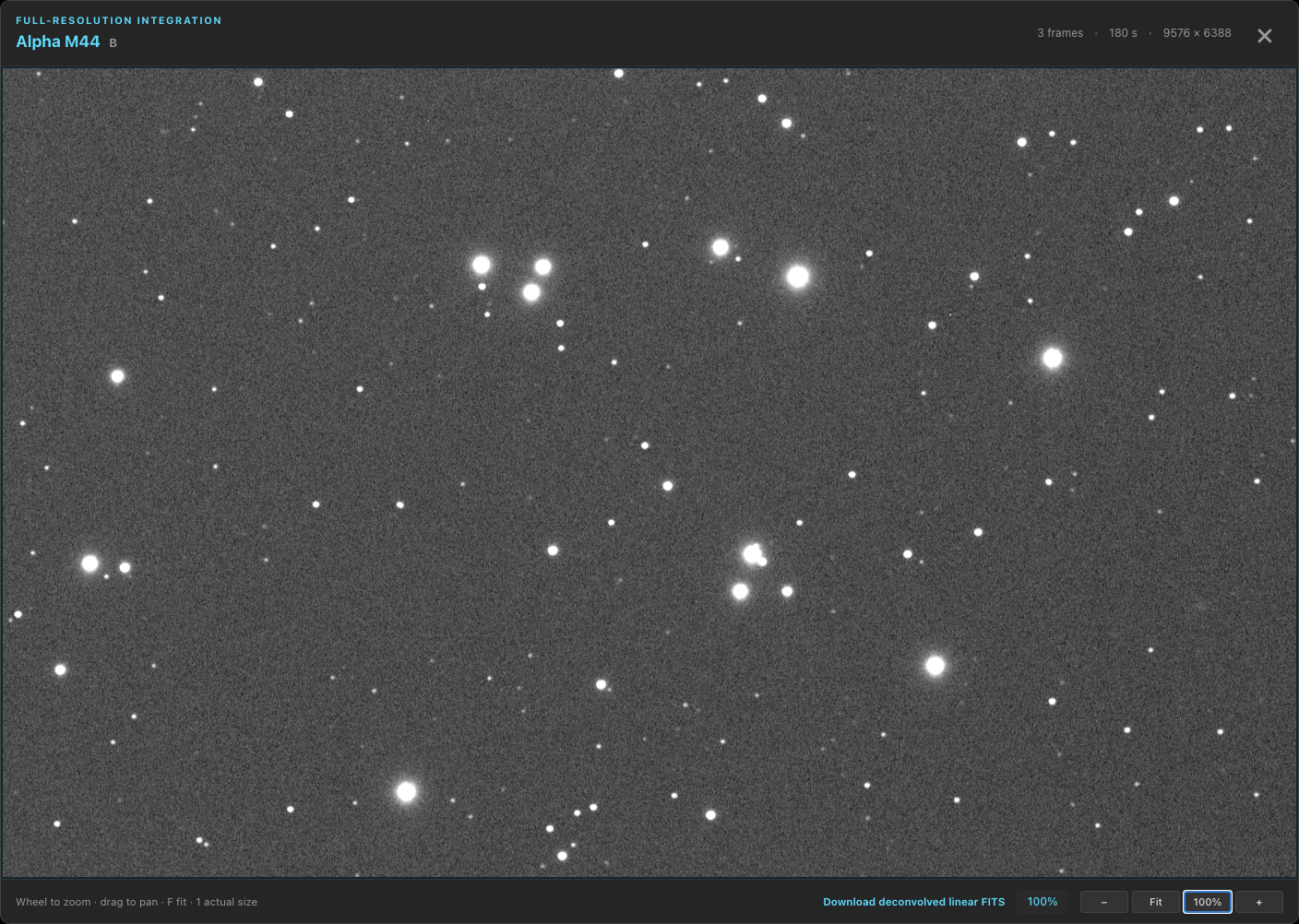
Inspect opens the full-resolution stack in the image inspector: scroll to zoom, drag to pan, F or 0 to fit, 1 for one image pixel per screen pixel. FITS downloads the linear, unstretched 32-bit float integration with its WCS and Seiza's frame counters, ready for other processing software.
View processing on a card sets a display stretch, optional deconvolution and, where the server has them, RC-Astro tools. Apply processing renders new previews from the cached FITS as a processing run; Revert processing returns to the original. The stack itself is never rewritten.
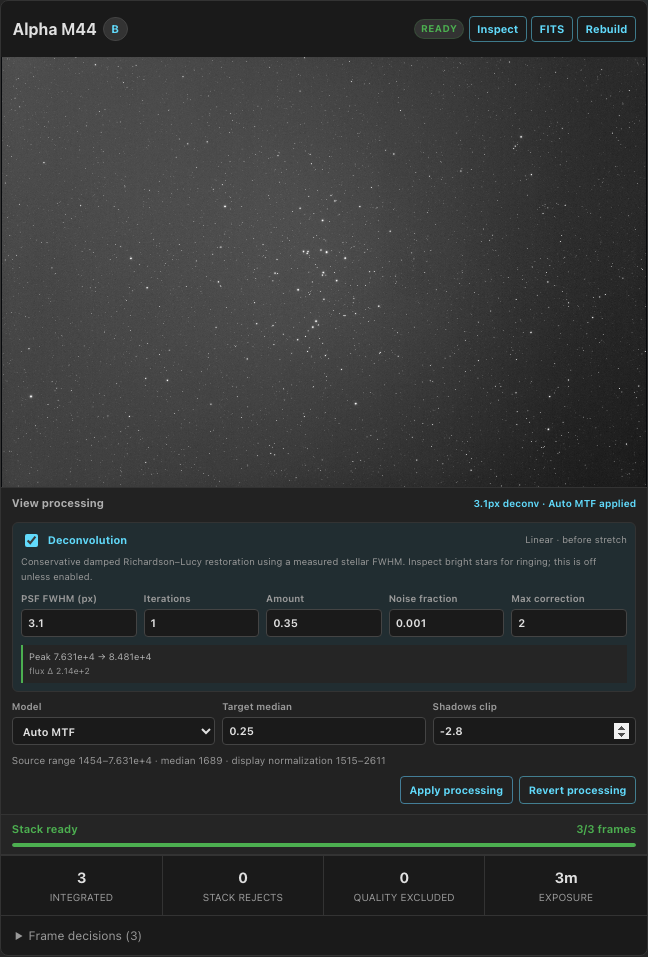
If you leave Stacks during mono processing and return, the card restores its progress. Apply processing stays disabled until the run ends. A color build that fails to prepare shows the reason beside Apply processing stack when started there, or at the top of the card otherwise.
Choose a stretch
Open View processing on a stack card and choose a stretch model. Click Apply processing to render the preview. Auto MTF remains the default; the linear stack stays unchanged.
- Median anchor sets the background median to Target median. Adjust Black point σ to set the black point relative to background noise. Curves boost lifts tones above the target; Highlight compression limits bright highlights above its Knee.
- Layered treats broad structure and fine detail separately. Set Target background, then adjust Contrast recovery to retain detail in bright structure. Scale (px) sets the size that separates structure from detail. Dynamic range compression reduces bright star cores. For color images, Saturation and Saturation boost increase color while Lightness mask keeps dark background noise from gaining color.
Layered preserves the existing color balance. Calibrate color first if the image has a color cast.
Keep channels the same way up
A German equatorial mount turns the field 180° at a meridian flip. Registration aligns both halves on one grid, but the reference frame sets which way up the stack comes out, and two channels can disagree. PSF Guard turns a finished stack by a half turn when its reference faces the wrong way. The turn reverses the pixel order: no resampling, and the camera angle is kept.
It decides by the strongest evidence it has:
- A cached plate solve or a valid WCS on the reference frame: north goes in the upper half. No new plate solve is run.
- The reference frame's
PIERSIDEheader, read against any channel in the build that was solved. - The side most of that stack's exposure time faced.
The first two give every channel of a target the same answer. The third
only knows one stack, so solve one frame per channel or record
PIERSIDE to tie channels together. A night that never flipped
is never turned.
Compose color
Once a target has mono stacks for L, R, G and B, or for H-alpha and OIII, Stacks adds Combine channel stacks. Color is its own job: changing a palette never restacks the channels.
- RGB needs R, G and B; LRGB adds L.
- Narrowband needs H-alpha and OIII for HOO and Foraxx HOO. SII adds SHO, SOH, HSO, HOS, OSH, OHS and Foraxx SHO.
Color follows its channels. Once a build leaves none of a target's channels waiting, PSF Guard composes the target's color previews again from the newest stacks, with the same palette, crop and processing; a preview whose channels did not change is left alone. A target with no color preview yet gets its first after a build started from Stacks: LRGB when it has L, R, G and B, else RGB, else the first narrowband palette its channels allow. Automatic refreshes compose only what was composed before.
With exposure groups on, each card matches channels of one exposure band, so 30 s and 300 s RGB give two cards. A band missing a channel lists its missing channels. Custom combination, below the target's cards, lets you choose sources for mixed exposures or ambiguous filters.
Compose color while stacks build
A color request appears immediately as Preparing color preview. If its target’s channels are preparing, queued or building, the card shows Waiting for the channel builds to finish. PSF Guard then reads the latest frames, grades and calibration and uses the new stacks. You can stop it while it waits. The composition survives a server restart.
A color composition you start can run alongside queued or running stack builds when either condition holds:
- PSF Guard has cached the prepared channels, including any deconvolution and RC-Astro results, with the same inputs and preparation settings.
- The composition needs no deconvolution or RC-Astro, and no other queued or running composition is preparing the same inputs.
For example, change a color card's stretch, color calibration or crop and click Apply processing stack. PSF Guard reuses compatible prepared channels. After Build current set or Build channel, the same rule lets a target's color compose once its own channels finish, while other targets' stacks build.
Only one such composition runs at a time; further compositions in this separate queue run in request order. In the jobs list, Composing color has no build-queue position or reorder controls. While queued, it shows Waiting for the composition ahead. The composition and stack build share CPU and memory.
Compositions that need new deconvolution or RC-Astro results still use the build queue. So do compositions whose inputs are not cached when another job is preparing those same inputs, and all compositions after automatic stack refreshes. Starting an automatic composition yourself while it is queued keeps its existing place.
After a server restart, PSF Guard applies the same rules to restored color jobs. If a source channel rebuilds while a composition runs, that composition keeps its saved result but does not replace the latest color preview.
Compose WBPP masters
When WBPP masters cover the channels a preview needs, Combine channel stacks shows a card marked WBPP. This works alongside PSF Guard's stacks, including projects split by exposure. A target with only WBPP masters and no exposure split uses the standard color card.
RGB needs R, G and B; LRGB also needs L. Narrowband needs at least H-alpha and OIII, with SII for the palettes that use it. Source labels include the sub-exposure when known, such as R (WBPP, 300 s).
If a filter has several WBPP masters, the automatic card stays disabled with a message such as Multiple R stacks. Open Custom combination and choose the master for each channel. In a project without exposure groups, you can also use the card's source menus.
PSF Guard does not automatically mix its stacks with WBPP masters. Choose each input yourself when you want a mixed combination.
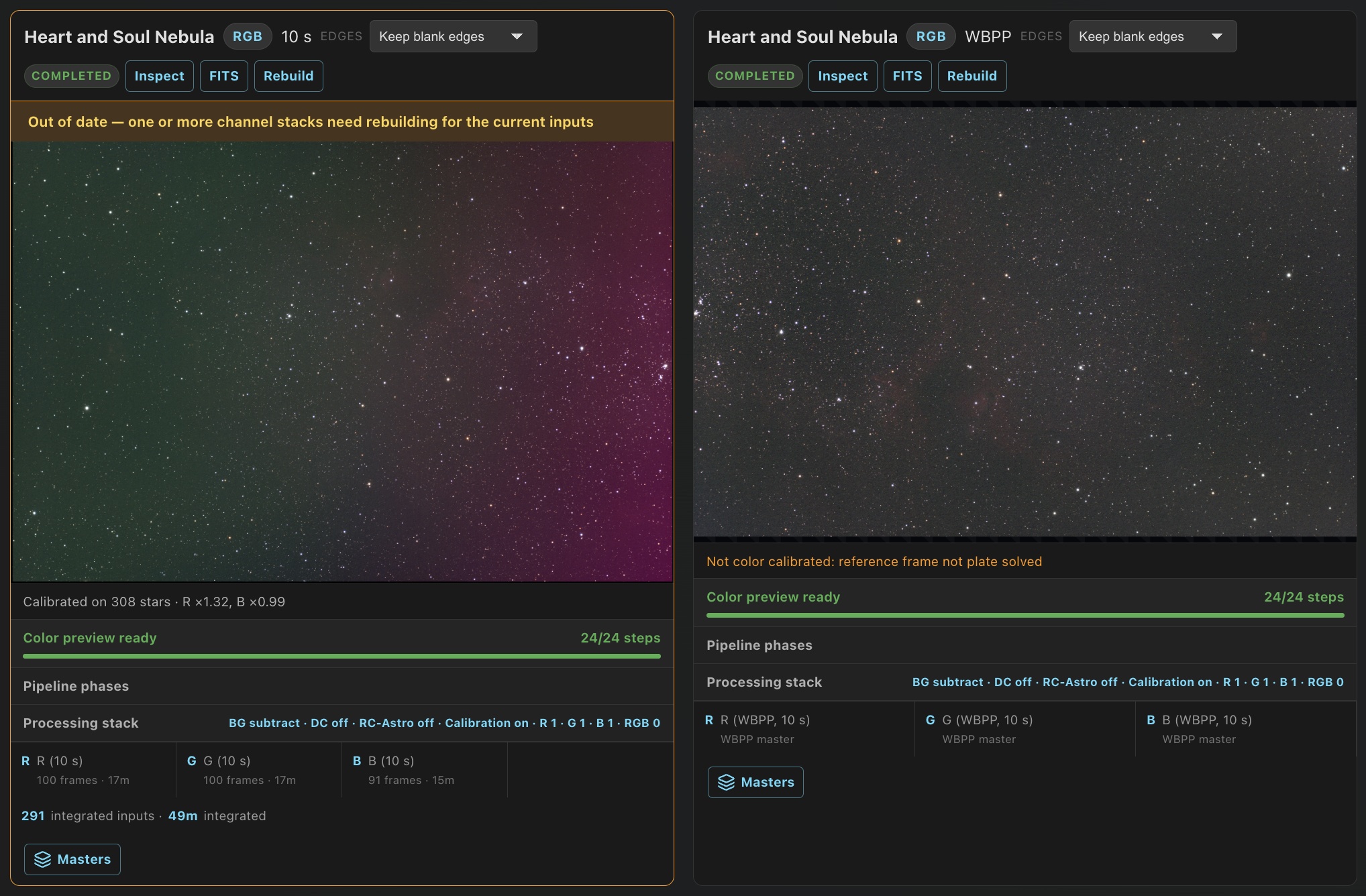
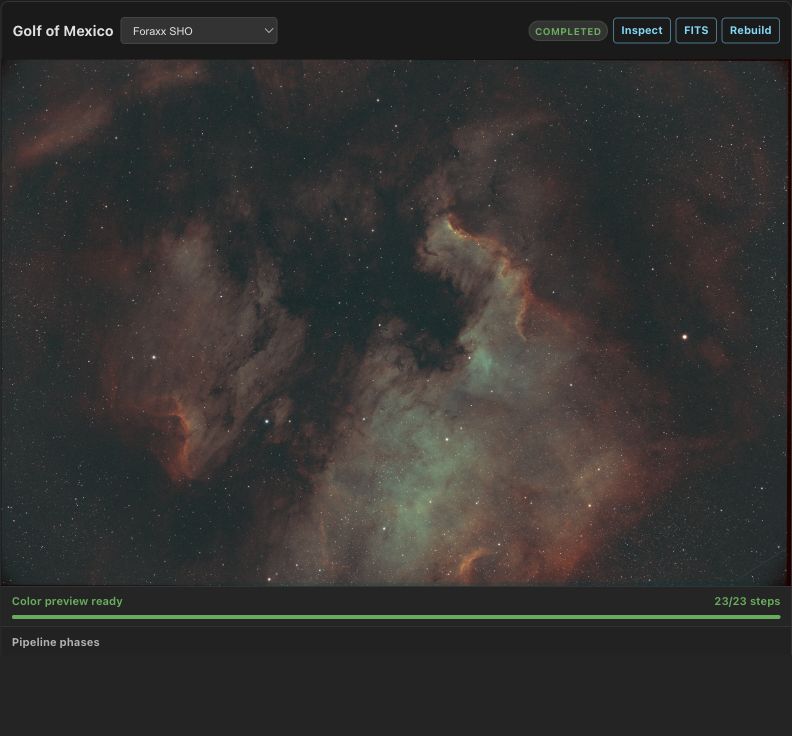
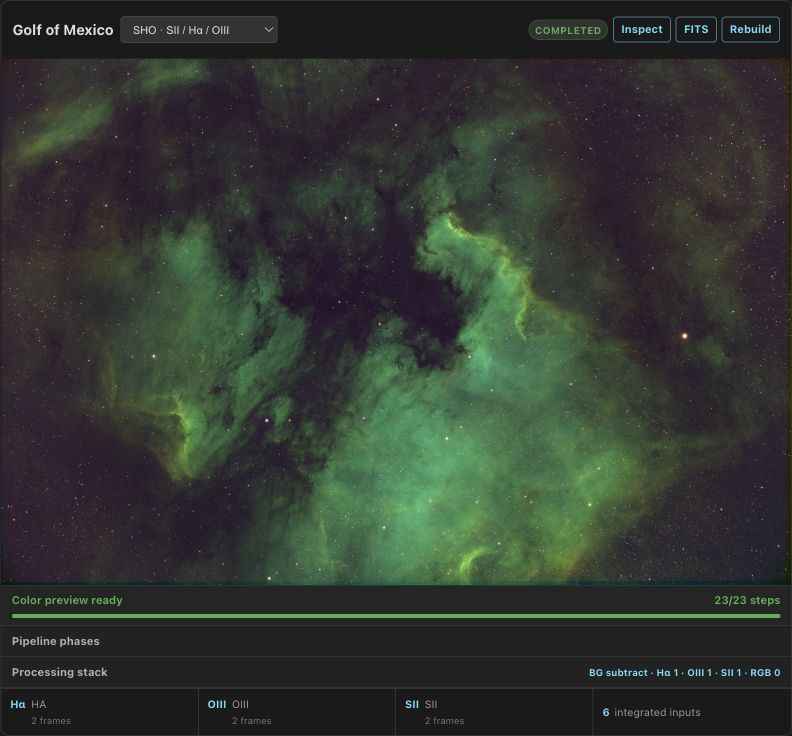
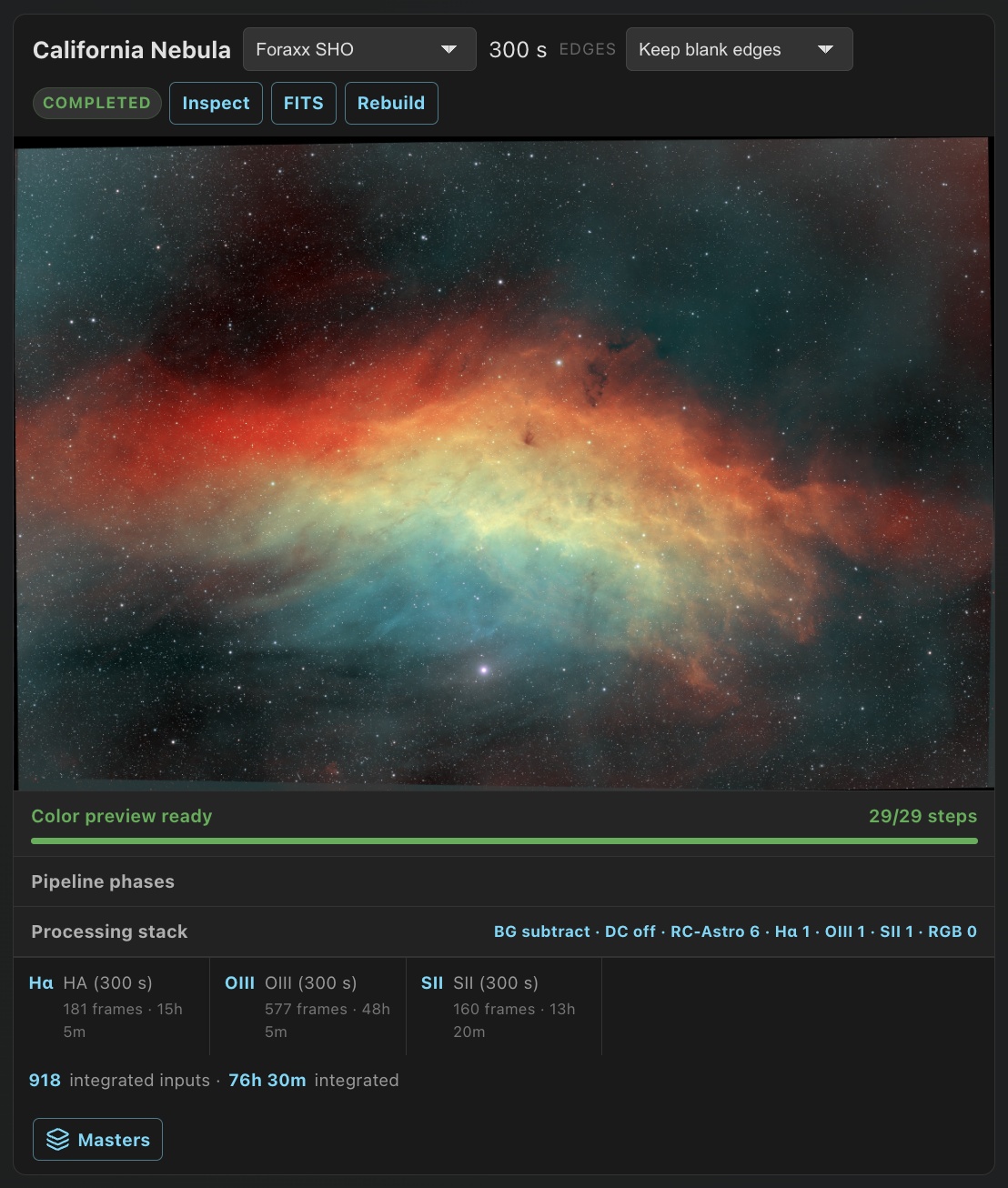
Rebuilding a channel marks its color previews Out of date but leaves them visible. FITS on a color card downloads the RGB result as 32-bit float, with the palette recorded in its header.
Calibrate color against Gaia stars
Color calibration is on by default for RGB and LRGB compositions and one-shot-color stacks. It balances star colors against Gaia measurements and neutralizes the sky background. It does not apply to narrowband palettes.
- Open Settings → Catalogs and install Gaia colors (about 480 MB). Installation runs as a background job.
- Plate solve the reference frame used by the stack. Calibration requires a fresh pixel-derived solution; embedded FITS WCS alone is not enough.
- Build or refresh the color preview. For an existing one-shot-color stack, click Build current set to refresh its card preview from the saved FITS. If the message refers to applied processing, use Apply processing in View processing instead. Changes to frames or stacking settings still rebuild the affected stack.
- Check the card's calibration line for the number of stars and channel gains, or the reason calibration was skipped.
A narrow field may have too few suitable stars: calibration needs at least 20 clean, uncrowded stars per fit. If calibration cannot run, PSF Guard still produces the preview and explains why it skipped calibration.
Keep the channels' stretch stages shared to preserve the calibrated balance. Separate channel stretches can undo much of the balance; the card reports channels stretched separately. To disable calibration, turn off Color calibration in the composition's Processing stack editor or the one-shot-color stack's View processing.
Stacks built with 0.12.3 record where source frames clipped. Color calibration keeps those star cores neutral instead of tinting them cyan or blue. Existing stacks gain this data when rebuilt. Imported WBPP masters and stacks without clipping data keep the previous behavior. Starless results do not apply this correction because the star cores have been replaced.
Trim registration edges
Registering one channel onto another leaves blank edges where it did not reach. Each color card's Edges picker chooses what to keep:
| Choice | Keeps |
|---|---|
| Keep blank edges | Default. The whole reference grid. |
| Trim to covered box | The box the covered pixels span. Enough for dithered channels. |
| Trim to full coverage | The largest rectangle every channel covers. Removes the corners a meridian flip or rotator leaves. |
The crop happens before normalization, so every channel scales from the same sky,
and the FITS moves CRPIX to keep the plate solution. The card reports the
kept size and share. When one channel's coverage looks like a pointing error rather
than dither, the card identifies the channel.
Remove the background
Before registration, PSF Guard fits and subtracts each channel's background with Seiza. The automatic model compares constant, linear and quadratic surfaces and takes the simplest that clearly improves the fit. All channels of one preview get the same surface shape, which keeps the corners from turning green on one side and magenta on the other. When a channel has a fresh plate solve, large cataloged nebulae are kept out of the samples.
The Processing stack editor sets subtraction or division, strength, sampling, and an ordered list of stretch stages per input and for the RGB output. Apply processing stack builds a new preview; Revert edits and Reset defaults go back.
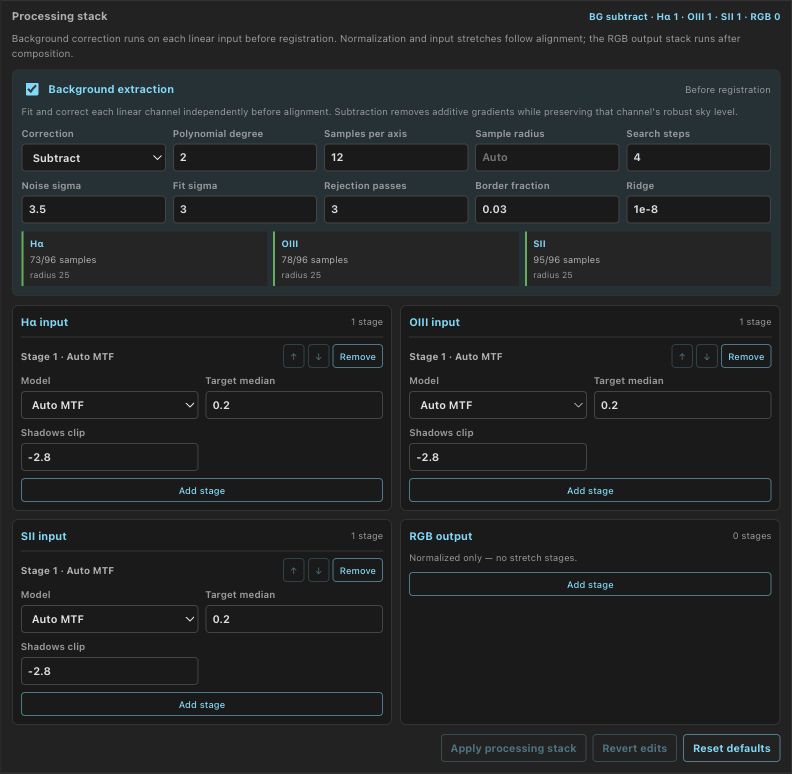
Deconvolution and RC-Astro tools
Seiza deconvolution is off by default. Turn it on in View processing or per color input, and give the measured star FWHM in pixels. It is a view setting: the stack stays linear and unchanged, and the inspector offers the deconvolved FITS while it is on.
When the server has RC-Astro's rc-astro CLI installed and
licensed, RC-Astro tools offers BlurXTerminator,
NoiseXTerminator and StarXTerminator on the linear data, before the stretch,
in View processing and on each color input.
Star removal keeps both halves, with a Starless /
Stars switch and a stars FITS. Set
PSF_GUARD_RC_ASTRO when the CLI is not on the server's
PATH.
Each field takes the range the installed tool accepts. A value outside it is marked with that range, and Apply processing or Apply processing stack stops and says which field is wrong. When the server refuses a color card's build or processing, the reason shows beside the button you pressed.
Use channel processing in a color composition
In Processing stack → Deconvolution and RC-Astro, From each channel card is the default for new color previews. Each input follows the tools applied on its channel card, including after an automatic rebuild. A card with only a stretch supplies no deconvolution or RC-Astro steps. Input lanes list the steps used; changing a card marks the color preview out of date.
Choose Set in this build to set tools per input instead. It starts with the cards' current choices. Color previews made before 0.12.3 keep their own settings until you change this choice.
Tools run on each channel's own stack before background extraction and alignment. A channel card and color preview with matching settings reuse the same results. Changing background extraction, alignment or a stretch does not rerun those tools; new frames rerun the affected channel's tools.
If Re-apply processing when a stack refreshes is off, refreshed cards have no processing for the color preview to follow. Apply the card's tools again, then rebuild the color preview.

Process color channels together
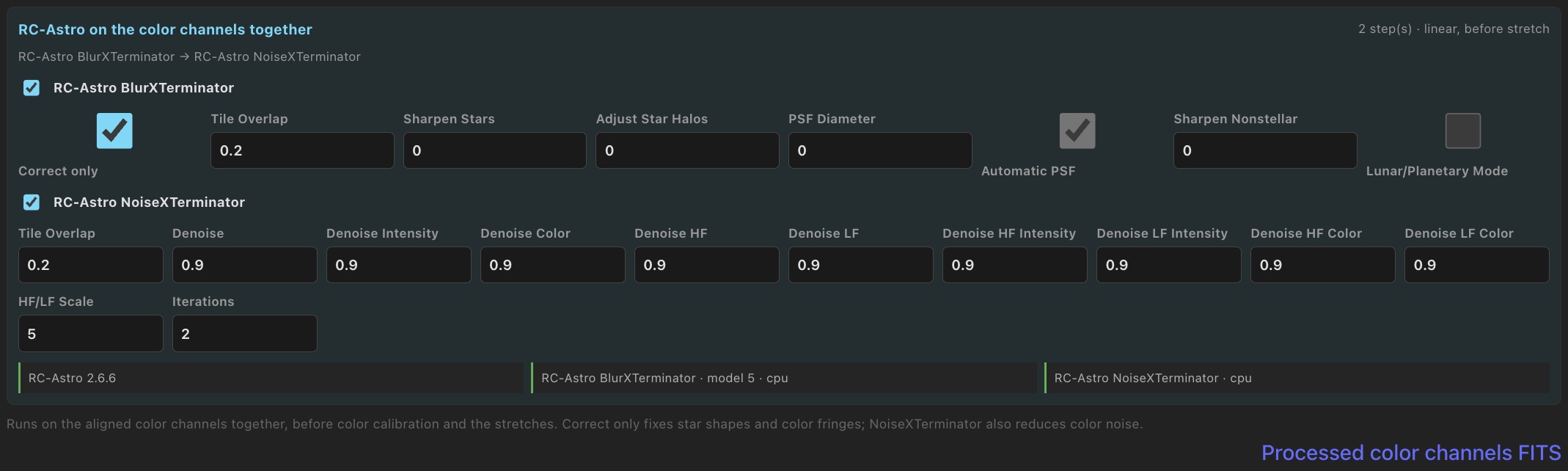
With RC-Astro installed and licensed on the server, open RC-Astro on the color channels together in Processing stack. It is off by default. BlurXTerminator and NoiseXTerminator run on the aligned channels before color calibration and stretching.
- BlurXTerminator starts in Correct only mode to correct star shapes and color fringes without sharpening. Sharpen individual channels on their cards or in their input lanes.
- NoiseXTerminator reduces color noise. StarXTerminator remains available on individual channel stacks.
LRGB uses R, G and B here, without luminance. Narrowband uses its emission-line channels. Changes to calibration, crop or stretch reuse these tool results. Download them with Processed color channels FITS. Every BlurXTerminator section also offers Correct only.
Save processing setups
Setups at the top of View processing and the color Processing stack saves the current parameters under a name. Choosing a setup fills the editor; nothing renders until you apply it. A view setup stores the stretch, deconvolution and RC-Astro steps. A color setup stores background extraction, per-channel processing and output stretches, and matches channels by name on another target.
Setups serve every database on the server. Settings → Setups lists, deletes, imports and exports them. On a server with accounts, viewers can list, apply and export; saving, deleting and importing need an editor.
Processing runs
On a channel card, Apply processing starts a server-side
processing run for a stretch, deconvolution or RC-Astro tools. The run continues
if you leave the page. It uses the same worker as stack builds and joins the
build queue. Short color compositions can
run alongside that worker. While a channel-processing run waits, the
button shows which job is using the worker and how many runs are ahead, such as
Waiting for the stack build of M44 · Ha to finish. Once it runs, the
button shows its progress and the step under way: Applying… 42% ·
BlurXTerminator.
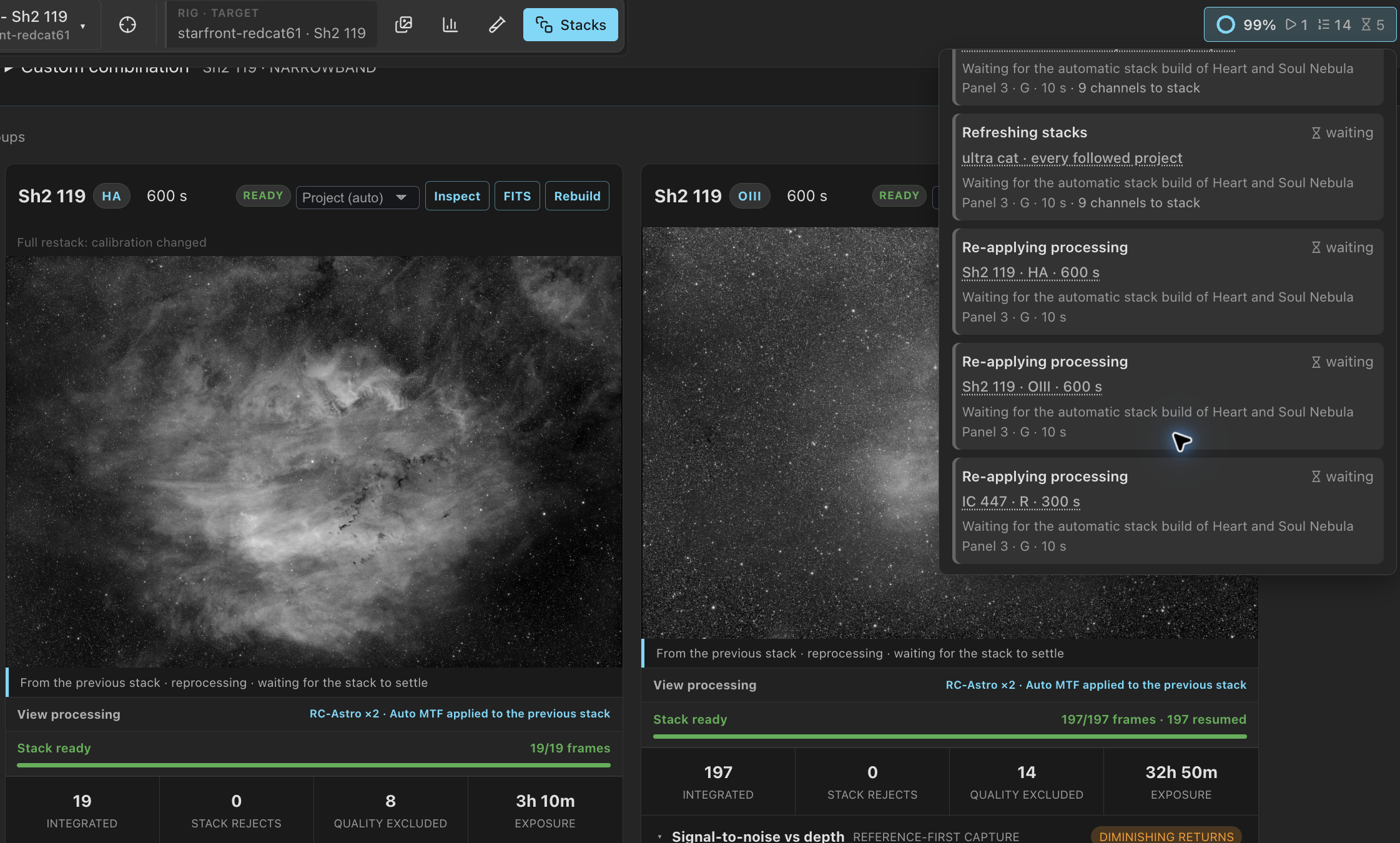
The header's background jobs list each run beside the builds: what it does
(BlurXTerminator, Deconvolution, Stretch, or a
chain's steps joined with +), the target and channel, and its place in
the line or its progress. Click the target to open its stacks. ↑ and
↓ move a queued run and × takes it out of the line.
Stop ends a running RC-Astro run: the tool is killed, the steps
already finished stay cached, and the button shows Processing was
stopped. A running stretch or deconvolution has no Stop; it finishes in
moments. A build you start waits behind processing runs asked for earlier unless you
move it.
Processing runs survive a restart. A server stop kills a running RC-Astro tool rather than wait minutes for it. After the restart the run comes back in its place in the line and resumes after the last tool step that finished, and an open page resumes showing its progress. A run cut off by two restarts in a row, clean stops included, is not started a third time.
Re-apply processing when a stack refreshes
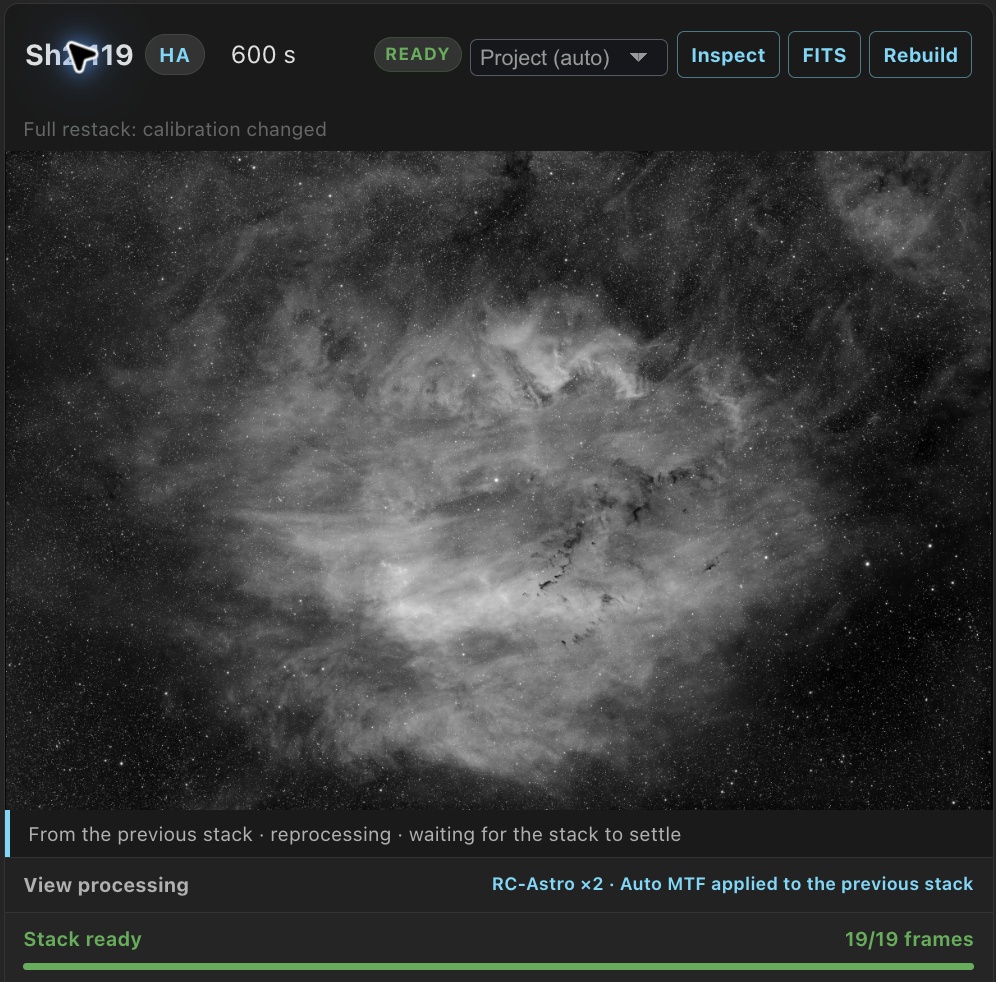
A rebuilt stack, from an automatic refresh or Rebuild, gets the processing its card showed: the same stretch, deconvolution and RC-Astro tools run again on the new stack, with no page open. Re-apply processing when a stack refreshes, under Settings → Stacking → Stack previews → Processing, is on by default.
- After a build you start or take over, processing appears under Started by you and runs next, ahead of your other queued builds. For an R, G and B rebuild, the order is R build, R processing, G build, G processing, then B build and processing. PSF Guard reserves the next queue position for up to one minute while it checks the tools. New work does not interrupt this processing once it starts.
- After an automatic refresh, processing waits for the project's refresh delay, then queues behind work you start and builds of its own target. It does not wait for every other target’s builds. The header lists it under Automatic as Re-applying processing and explains what it is waiting for. Work you start, or another automatic refresh that is due, can interrupt it. It resumes when the worker is free.
- If you stop a build, its completed channels wait for automatic reprocessing. Stopping does not immediately start RC-Astro. Stopping a processing run lets the next waiting run start.
- Until processing finishes, the card shows the previous stack's result, marked
From the previous stack · reprocessingwith the run's status. The new result then becomes the card's processing. - Only the newest stack is processed. A newer stack cancels any queued or running re-apply for the older stack.
- A re-apply that fails keeps the previous result, says
reprocessing failedwith the reason, and is not tried again on its own. - Your own Apply processing or Revert processing on the new stack replaces the re-apply.
- Turning the setting off cancels reprocessing that has not started. A running job finishes, unless other work interrupts it; it then stays stopped.
Reprocessing survives restarts and keeps its priority as work started by you or automatic work. A run interrupted by two consecutive restarts, or one that cannot be restored, stays stopped and shows the reason.
Find which frame made a defect
A stack can make a trail, reflection, dust shadow or hot pixel easier to see than any single frame does. In the inspector, click Find source artifact, drag a box around the defect, and click Search this region. PSF Guard maps the box back through registration into every source frame and ranks the crops by how far each sits from its peers.
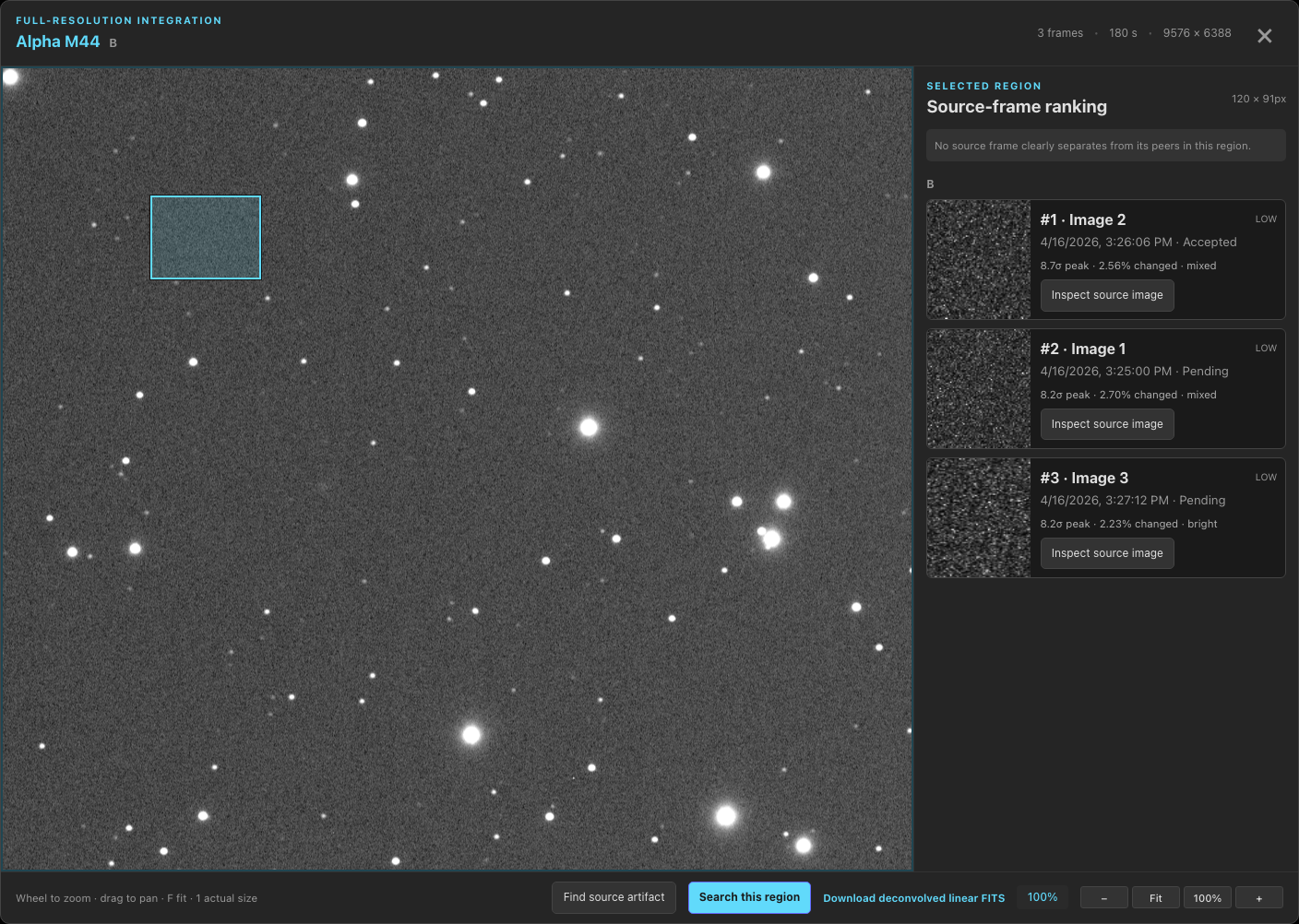
Each result gives its peak sigma, whether it is brighter or darker, and a shape: compact spot, trail, ring, or broad shadow. Weak results stay unlabeled. The search never changes a grade. It cannot find a defect that sits in the same registered place on every frame, since that becomes the baseline. The box must be at least 8 pixels a side and stops at 512.
Mosaic panels
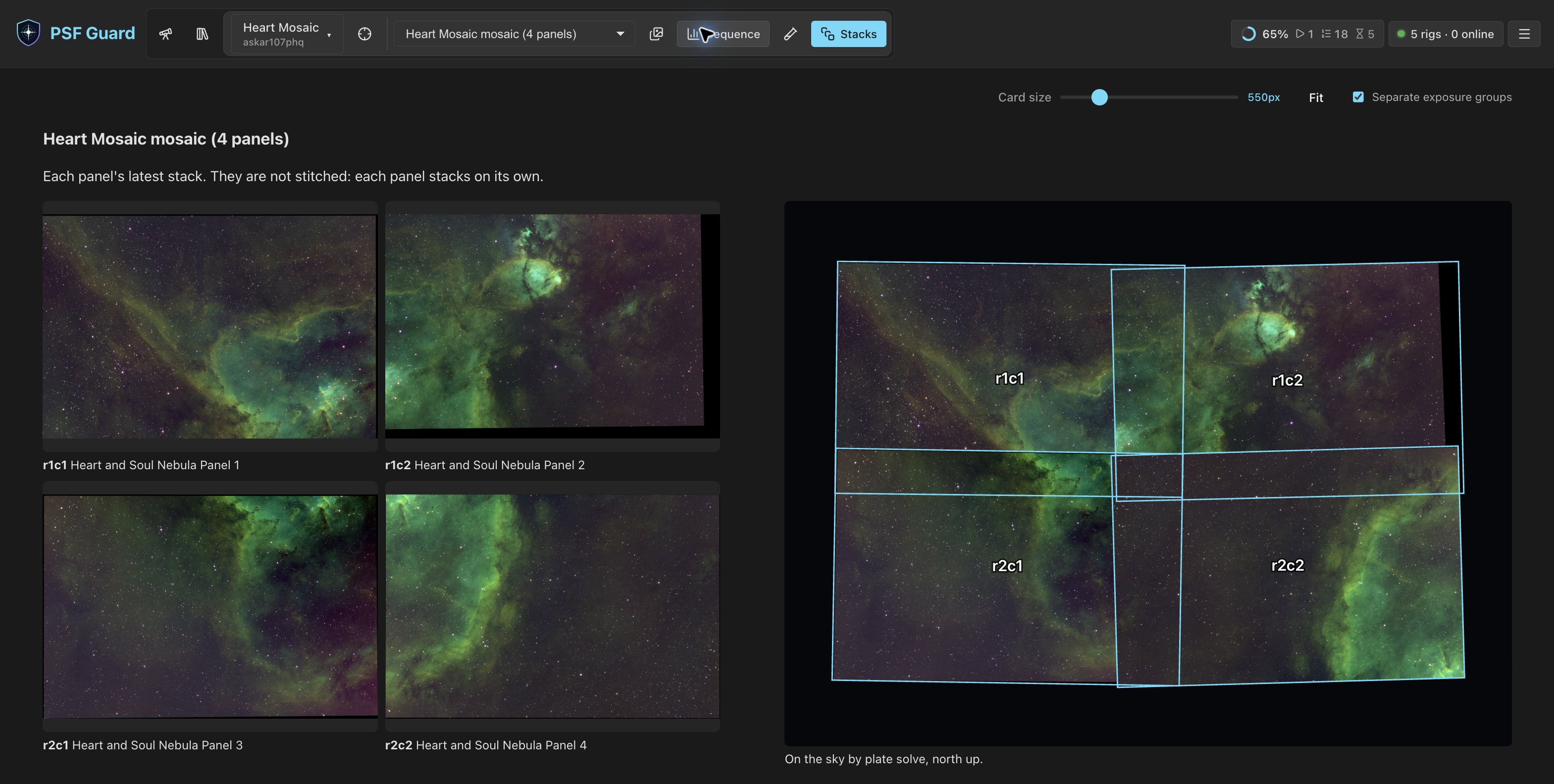
When a project's targets are one mosaic, the header's target switcher offers the mosaic as one choice, such as M31 mosaic (4 panels). In Stacks it lays each panel's latest stack out as the mosaic's grid, and beside it places every solved stack on the sky by its plate solve, north up. Nothing is stitched: each panel still stacks, grades and calibrates on its own. The caption lists panels with no stack or no solve yet.
Export for other stackers
Once the stacks look right, export the accepted lights and their matched calibration frames, or run PixInsight's WBPP on the server. See Export & AstroBin and WBPP Runs.