Installation
Install the desktop app, or run PSF Guard as a server from Docker, a standalone binary, a Fedora RPM, or a source build. Choose a catalog once it runs.
Desktop app
Download the installer for your platform from the latest release:
| Platform | Asset |
|---|---|
| Windows x64 | PSF.Guard_<version>_x64_en-US.msi, or the NSIS -setup.exe |
| macOS (Apple Silicon) | PSF.Guard_<version>_aarch64.dmg |
| Linux x64 | PSF.Guard_<version>_amd64.deb or .AppImage |
The NSIS installer also installs psf-guard-cli.exe and adds it
to your user PATH, so the full CLI runs from any terminal.
Launch the app, then go to Getting Started to build a catalog from your image folders.
Resize the UI
Open the hamburger menu and choose Zoom in, Zoom out or Reset to 100%. Use Cmd on macOS or Ctrl on Windows and Linux with +, − or 0, including while Settings is open. The app changes the whole UI from 50% to 200% and saves the scale on this device. Image zoom has separate controls. In a browser, use the browser's zoom controls.
Fix the server port
The desktop app runs its own server on localhost. By default it picks a free port each time it starts. To keep one address:
- Open Settings → Server.
- Under Port selection, choose Fixed port and enter a Server port from 1024 to 65535.
- Click Save port, then Restart server.
The port applies to the whole desktop server: the app, browser access,
the REST API and the MCP endpoint. It is kept in
desktop.json beside the registry. If another program holds the
port at a later start, the app shows the error and the Server settings:
choose another port or Automatic, then restart the
server.
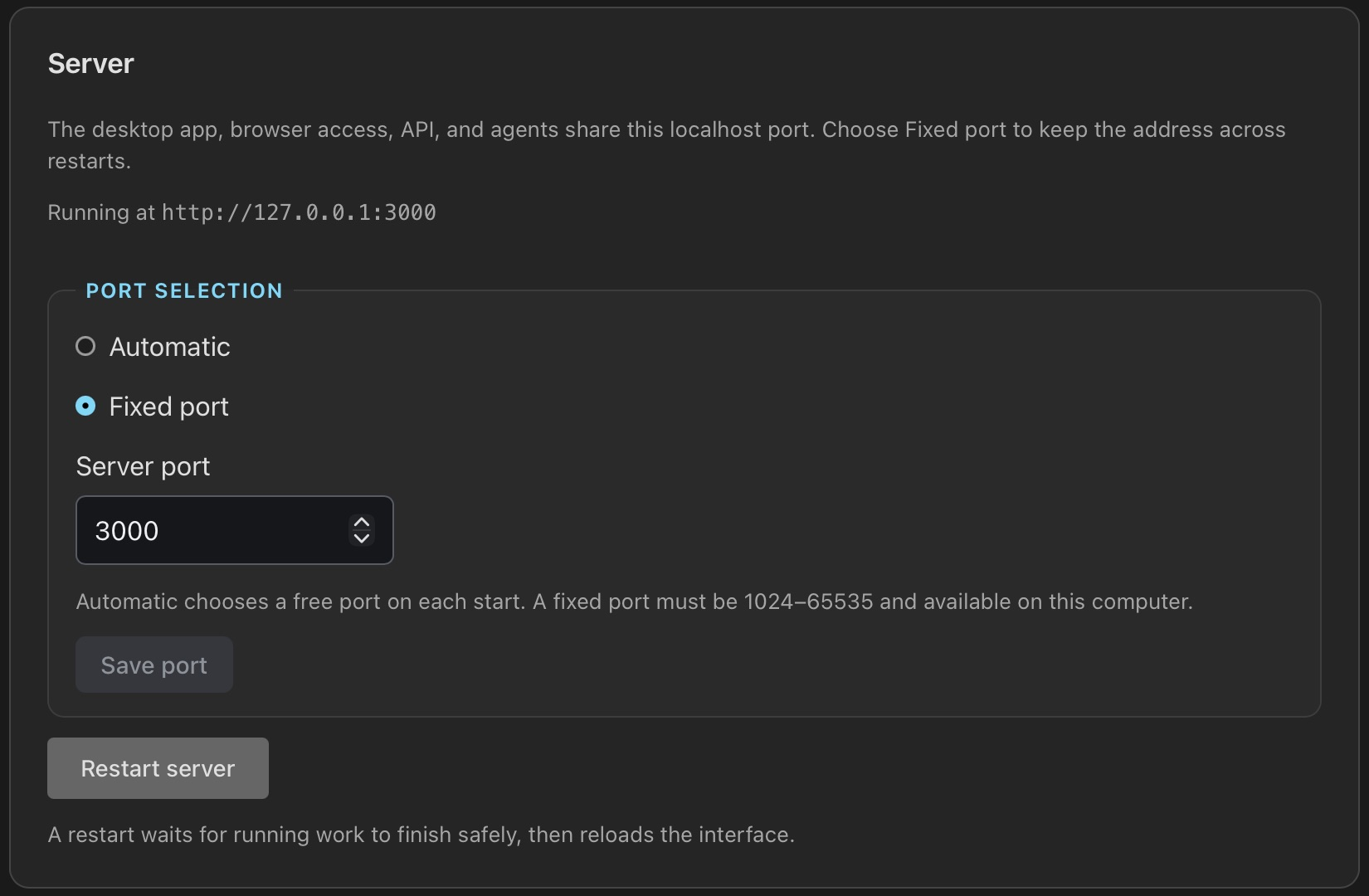
Restart server, and Restart Server at the foot of other tabs, wait for the server's running work to stop at a safe point, so the job queue it saves is kept, then reload the interface. If that work still runs after two minutes, Settings and the log say what it waits for; restart the app to end it.
Log files
The desktop app writes one log file a day and keeps a week of them. Open logs, at the foot of Settings, opens the folder:
| Platform | Log folder |
|---|---|
| Windows | %LOCALAPPDATA%\com.theatrus.psf-guard\logs |
| macOS | ~/Library/Logs/com.theatrus.psf-guard |
| Linux | ~/.local/share/com.theatrus.psf-guard/logs |
The log records the server's console output, including each frame a stack leaves
out or rejects, and why. RUST_LOG sets the level; the default is
info.
Docker on a Linux server or NAS
The database mount must be writable. Image folders can stay read-only.
docker run -d --name psf-guard -p 3000:3000 \
  -v psf-guard-data:/data \
  -v /path/to/catalog.sqlite:/data/database.sqlite \
  -v /path/to/images:/images:ro \
  ghcr.io/theatrus/psf-guard:latest

# Add the first editor; it asks for the password twice
docker exec -it psf-guard psf-guard users add admin --role read-write
The container listens on every interface, so the server answers 401 until
a user exists and then asks for a login. Open
http://localhost:3000/ and sign in. See
Server Accounts.
The repository's
docker-compose.yml
does the same, with a healthcheck.
Keep /data on a volume
The image writes everything it keeps below /data, so a
redeploy or an image update loses nothing:
| Path | Holds |
|---|---|
/data/config/psf-guard | Database registry (config.json), browser users and API tokens (auth.json), each account's view choices (user-preferences.json), planning store (director-meta.sqlite), job queue journal (config.jobs.json), backup schedule state, collaboration credentials |
/data/cache | Previews, plate solves, quality scans, stacks, calibration masters, offline sky maps |
/data/seiza | Seiza catalogs installed under Settings → Catalogs |
/data/database.sqlite | The catalog you mount. Writable: grading updates it. |
/images | Your image folders. Read-only is enough to review and grade; removing rejects needs them writable. |
A host folder works in place of a named volume if user 1000 can write it. To keep stacks or masters on another disk, mount it and choose it under Settings → Storage → Folders; see Storage & Performance.
Image tags
| Tag | Follows |
|---|---|
latest | The newest release |
0.11.0 | One release, pinned |
0.11 | The newest patch of that release line |
edge | The main branch, with work not yet released |
Healthcheck and logs
The image includes curl. The compose file checks
/api/auth/status, which answers without a login, so the check
passes before the first user exists:
healthcheck:
  test: ["CMD", "curl", "-fsS", "http://localhost:3000/api/auth/status"]
  interval: 30s
  timeout: 10s
  retries: 3
  start_period: 40s
The server logs to the container's output (docker logs psf-guard).
RUST_LOG sets the level; the compose file sets info.
Configuration file and Seiza catalogs
Mount a TOML file and pass --config to set the port, preview
format, pre-generation, or remote sync grants:
docker run -d --name psf-guard -p 3000:3000 \
  -v psf-guard-data:/data \
  -v /path/to/catalog.sqlite:/data/database.sqlite \
  -v /path/to/images:/images:ro \
  -v /path/to/psf-guard.toml:/config/psf-guard.toml:ro \
  ghcr.io/theatrus/psf-guard:latest \
  server --config /config/psf-guard.toml /data/database.sqlite /images
To use Seiza catalogs you already have instead of downloading them in
Settings, mount them read-only and set SEIZA_CATALOG_DIR:
-v /path/to/seiza-data:/catalogs:ro -e SEIZA_CATALOG_DIR=/catalogs.
See Configuration & API and
Sky Context & Solver.
Standalone CLI binaries
These links always download the latest release:
| Platform | Download |
|---|---|
| Linux x64 | psf-guard-linux-x64 |
| macOS (Apple Silicon) | psf-guard-macos-arm64 |
| Windows x64 | psf-guard-windows-x64.exe |
# Linux / macOS
chmod +x psf-guard-*
./psf-guard-linux-x64 server catalog.sqlite /path/to/images/
:: Windows: back up the database first, then serve it
copy "%LOCALAPPDATA%\NINA\SchedulerPlugin\schedulerdb.sqlite" schedulerdb-backup.sqlite
psf-guard-windows-x64.exe server "%LOCALAPPDATA%\NINA\SchedulerPlugin\schedulerdb.sqlite" C:\path\to\imagesThen open http://localhost:3000/.
Fedora RPM
Each release attaches a Fedora 44 RPM:
sudo dnf install ./psf-guard-*.fc44.x86_64.rpmThe package installs the CLI and a psf-guard.service systemd
unit that runs the server as a daemon. To build for another Fedora release,
see
packaging/rpm/README.md.
Stopping or restarting the service lets background work stop at its next safe point: a quality scan saves what it measured, a stack build checkpoints and resumes after the restart, and imports and calibration grading stop at a commit. The log lists the work still blocking shutdown. See Storage & Performance.
Build from source
git clone https://github.com/theatrus/psf-guard.git
cd psf-guard
cargo build --release
./target/release/psf-guard server catalog.sqlite /path/to/images/
The build needs Rust and Node.js with npm. It embeds the React frontend. Image processing uses the pure-Rust Seiza crates, so no native computer-vision libraries are needed.
Updates
PSF Guard checks for newer releases without sending catalog or image data. The server fetches the release notice at start and once a day, keeps it for 24 hours, and serves it to every browser; reloading the page never fetches the public feed. A banner below the header shows the new version and links its release notes.
A browser tab left open across a server update notices it: a PSF Guard was updated bar offers Reload now, and the tab reloads by itself the next time you change views. Unsaved plan edits still ask first.
The desktop app can also download, verify and install a signed update: click Install update. A server never downloads or installs an executable. Update its binary, package or Docker image yourself.
psf-guard backup
on a server. See Backups.