Configuration and API
The JSON registry lists catalogs and stores the choices made in Settings; the server's TOML file sets ports, caches and grants at start. The REST API exposes what the UI does.
The desktop app manages all of this in Settings.
Check the running server
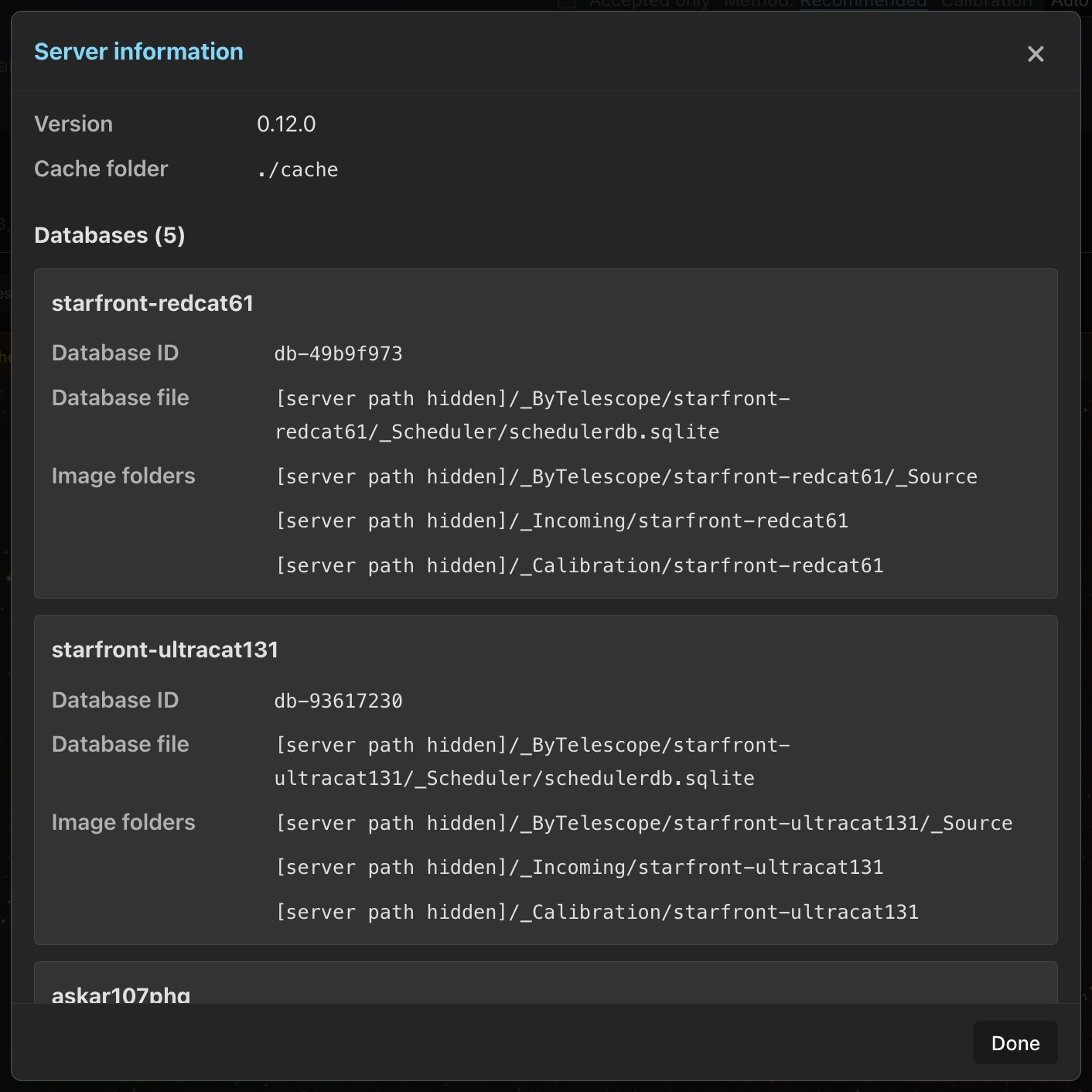
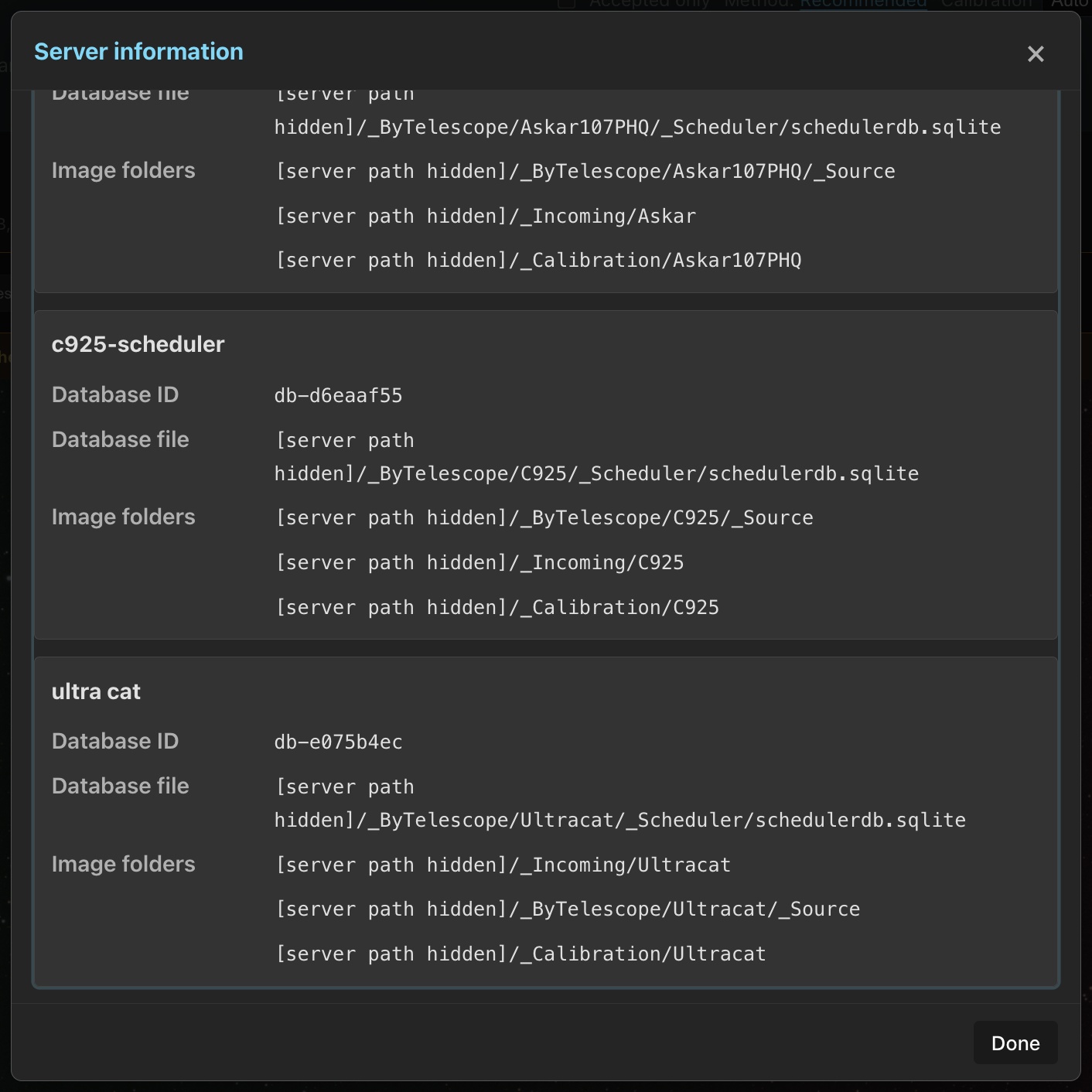
Open Menu → Server information to check the running Version and Cache folder. Each configured database lists its Database ID, Database file and Image folders separately. In a browser, these paths refer to the server.
The details scroll within the dialog, and long paths wrap. The heading and close controls stay visible. You can use the mouse wheel or touch, or Tab to Server details and press Page Down. Done, Escape or the close button closes the dialog and returns focus to the menu.
Loading or connection errors appear separately for server information and the database list. Use Retry server information or Retry databases for the failed request.
Settings tabs
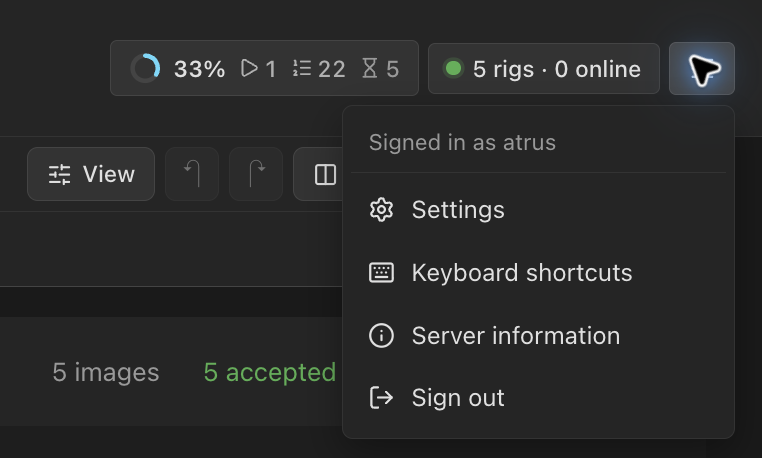
Open Settings from the menu at the right of the header, beside Keyboard shortcuts, Server information and, on a server with accounts, Sign out. Only editors can open Settings.
Every tab has the same layout: cards share a consistent width, related fields appear in named groups, and controls sit beside their labels. Settings opens on Databases. A tab shows only when it applies:
| Tab | Holds | See |
|---|---|---|
| Databases | Catalogs, imports, quality backfill, per-database options, Purge Rejects, Open Calibration, N.I.N.A. pairing. Adding or editing a catalog needs database management. | Import Images |
| Server | The desktop app's localhost port. Desktop app only. | Installation |
| Catalogs | Seiza data packages | Sky Context & Solver |
| Sync | Data Transfer, staged previews, Remote PSF Guard. Shows once a catalog exists. | Rejects & Sync |
| Setups | Processing setups, export defaults, PixInsight, AstroBin filter IDs. The PixInsight program and runs folder need database management. | Export, WBPP |
| Calibration | Matching, dark and flat masters, flat groups, light checks, frame grades, which lights stacks and exports keep, and settings for one rig | Calibration |
| Stacking | Stacking method and automatic previews | Stacks |
| Storage | Folders and disk limits. Changes need database management. | Storage |
| Backups | Back up now and scheduled backups. Needs database management. | Backups |
| Performance | Processor use | Processor use |
| Review | Grading, score chips, Sequence scoring defaults, night and hour marks, the project list and Library views. Signed in, they follow your account; otherwise this browser keeps them. | Library & Grader, Server Accounts |
| Rigs, Exposure templates | Planning's rigs, sites and template library | Rigs, Templates |
| Users | Accounts and API tokens, on a server with accounts | Server Accounts |
| Agents | MCP setup, on the desktop app or a server without accounts | MCP for Agents |
Databases offers image-folder import, a local TS file and the Sync plugin in one setup form. New TS file imports create an owned catalog and keep the source connected. Review automatic sync and grade writeback on the catalog's card. For new Target Scheduler databases, choose Import from Target Scheduler to import the database and set up sync. Your current Target Scheduler setup will keep working in 0.12. A later update will create a PSF Guard catalog for you and keep captures, plans and grades in sync with Target Scheduler. We plan to remove direct database access in 0.13 or later. See Import from Target Scheduler.
Unsaved edits
Settings asks before discarding unsaved edits when you click Done, × or outside the dialog. It checks changes to a rig's setup, a site, calibration, scoring defaults, storage folders, PixInsight, the desktop server port or the backup schedule. The prompt lists the forms with unsaved changes and offers Keep editing or Close without saving. The rig and site forms say Unsaved changes beside Save; folding a rig's setup or opening another site keeps its edits, and the browser asks before a reload drops them.

Catalog registry
The server can serve many catalogs, each a database with Target Scheduler's tables. Their list lives in a JSON registry, not in the TOML file:
| Platform | Registry |
|---|---|
| Windows | %APPDATA%\psf-guard\config.json |
| macOS | ~/Library/Application Support/psf-guard/config.json |
| Linux | ~/.config/psf-guard/config.json |
| Docker | /data/config/psf-guard/config.json |
psf-guard server <db> <dirs...> registers that
database on first run and reuses it afterwards. Settings and the
/api/databases endpoints edit the same list.
--registry /tmp/scratch.json runs a session that leaves your real
list alone. N.I.N.A.'s scheduler database on Windows is
%LOCALAPPDATA%\NINA\SchedulerPlugin\schedulerdb.sqlite.
{
  "id": "archive",
  "name": "Archive",
  "db_path": "/data/archive.sqlite",
  "image_dirs": ["/data/images"],
  "export_dir": "/data/stacking-exports",
  "process_dir": "/data/_Process"
}export_dir(Server export directory under Settings → Databases → Edit) turns on server-side exports into that folder. The browser picks a project, target and layout, never a path. Empty turns them off.process_dir(Process directory) is where a WBPP run may save its masters beside your finished work. See WBPP Runs.
Settings saves server-wide choices in the same file: processor shares, storage folders and disk limits, stacking, calibration, export defaults, AstroBin filter IDs, PixInsight, Remote PSF Guard peers and the backup schedule. A peer's key is kept in the clear there, so protect the file.
Files beside the registry
PSF Guard keeps its other state next to the registry. With a registry
named something other than config.json, each file takes the
registry's name as a prefix: catalogs.json gets
catalogs.auth.json.
| File | Holds |
|---|---|
auth.json | Browser users and API tokens, as hashes. See Server Accounts. |
user-preferences.json | Each account's view choices. See Server Accounts. |
desktop.json | The desktop app's server port. See Installation. |
director-meta.sqlite | The planning store: plans, framing, rigs, sites, exposure templates |
config.jobs.json | The job queue, kept across restarts. See Storage & Performance. |
collaboration-credentials.json | AstroCollab agent tokens, in plain text, mode 0600 on Unix and a user-only ACL on Windows. See Collaboration. |
backup-state.json | The backup schedule's last run and any retry. See Backups. |
psf-guard backup. Manual desktop backups and new desktop
schedules include collaboration-credentials.json and other secrets
by default; browser backups and the CLI exclude them by default. Saved schedules
keep their existing choice. Check Include secrets
before starting a backup or saving a schedule.
Planning store
Planning is on for every server. Its store,
director-meta.sqlite, sits beside the registry, and the desktop
app uses the same place. A server started without
--allow-database-management plans read-only over its catalogs:
plans, framing and rig profiles can be drafted, but activation, pushes and
Target Scheduler edits answer 403, and nothing is written into a
rig database.
# Keep the planning store somewhere else
psf-guard server --allow-database-management \
  --director-meta /srv/psf-guard/director-meta.sqlite
--director-meta needs --allow-database-management.
Its folder must exist. A missing file is created; an existing file must be a
planning store, never a catalog or another SQLite database. Back the store up
before an upgrade: Settings › Backups and
psf-guard backup copy it safely; give the command
--director-meta when the store sits elsewhere. Never copy a live
main file without its WAL. See Planning.
Offline sky maps
Framing can draw on N.I.N.A.'s whole-sky caches with no network. Install one into the server's cache:
psf-guard sky-maps install full --cache-dir /path/to/cache               # DSS, 3.3 GB
psf-guard sky-maps install nsns-ohs --cache-dir /path/to/cache           # NSNS SHO, 1.4 GB
psf-guard sky-maps install nsns-ohs-starless --cache-dir /path/to/cache  # starless, 0.5 GB
psf-guard sky-maps list --cache-dir /path/to/cache- Sets land in
<cache>/director/sky-maps/. A running server offers a new set within half a minute. installalso takes a zip URL. A folder copied from a rig's own%LOCALAPPDATA%\NINA\FramingAssistantCacheworks too: drop it undersky-maps/.- In Docker the default
./cacheis/data/cache:docker exec psf-guard psf-guard sky-maps install full. - An offline set stands in for its online survey: the DSS set for the DSS2 colour plates, the SHO set for the online NSNS SHO layer. The online layer stays a click away.
- The maps carry their own licences; the NSNS sets are CC BY-NC-SA. The framing view shows the attribution.
See Framing.
Seiza catalogs and plate solving
PSF Guard finds Seiza's catalogs the way Seiza does. Data installed with
seiza setup or under Settings → Catalogs
is found on its own. Point to another bundle with the
SEIZA_CATALOG_DIR environment variable or the top-level
astrometry block in the registry:
"astrometry": {
  "data_dir": "/path/to/seiza-data",
  "satellite_elements": "historical-or-active.tle"
}
Blind solves use the blind index beside the star catalog. A
blind_index setting or SEIZA_BLIND_INDEX still
chooses another. Restart PSF Guard after changing the variable or the block.
See Sky Context & Solver.
Docker
The image keeps everything it writes on the /data volume. It
sets XDG_CONFIG_HOME=/data/config, so the registry and the files
beside it live in /data/config/psf-guard;
SEIZA_CATALOG_DIR=/data/seiza, so catalogs installed in Settings
stay; and works in /data, so the default cache is
/data/cache. A redeploy or an image update keeps all of it. See
Installation.
Server TOML file
cp psf-guard.toml.example psf-guard.toml
psf-guard server --config psf-guard.toml
[server]
port = 3000
host = "0.0.0.0"
cors = true
# Shares of the logical cores. Settings → Performance overrides both.
#scan_worker_ratio = 0.5
#background_worker_ratio = 0.25
#preview_format = "png" # or "jpeg"
#preview_jpeg_quality = 88 # 50–100
#preview_color = true # colour by default for OSC frames
#keep_failed_uploads = false
[server.auth]
session_hours = 168
# Omit to follow the browser's HTTP or HTTPS scheme.
#secure_cookie = true
allow_read_only_compute = false
# Optional plain-text notice under the header
[server.banner]
title = "Demo site"
message = "This public demo uses sample data. Changes may be reset."
link_text = "Learn about PSF Guard"
link_url = "https://psf-guard.com/"
[cache]
directory = "./cache" # fixes the cache; omit it to choose one in Settings
#stack_directory = "/mnt/nas/psf-guard/stacks" # default: the cache
#calibration_directory = "/mnt/nas/psf-guard/masters" # default: the cache
file_ttl = "5m" # 30s, 5m, 1h, 2h30m, 1d ...
directory_ttl = "5m"
[pregeneration] # optional background preview warming
enabled = true
screen = true # 1200 px previews
large = false # 2000 px previews
#workers = 4| Key | Does |
|---|---|
scan_worker_ratio | Share of cores for work you wait on (default 0.5) |
background_worker_ratio | Share for background work (default 0.25). See Processor use. |
[cache] directory | The cache. Setting it here fixes it, so Settings cannot move it. |
stack_directory, calibration_directory | Folders for stacks and masters. See Storage. |
file_ttl, directory_ttl | How long file and folder listings are cached |
[server.auth] | Session length, cookie policy, and whether viewers may start compute. See Server Accounts. |
[server.banner] | A notice under the header. Plain text; set both link fields or neither, with http:// or https://. |
keep_failed_uploads | Keep a refused remote upload's staged file in the receive folder; the log gives its path |
Command-line options win over the file. A legacy [database] or
[images] section is still read but ignored in server mode:
databases come from the registry.
Preview format
Previews and annotated images are PNG by default: exact, the same pixels
the stretch made. preview_format = "jpeg" makes them about a
third the size, but JPEG smooths the faint detail where noise, hot pixels and
marginal stars live, so a frame can look cleaner than it is. Grading always
measures the FITS, never a preview. The two formats use different
extensions, so switching back finds the old files still valid. Nothing
deletes the other format; the server reports its size at start.
preview_color sets which rendition of a one-shot-color frame
pre-generation warms and the viewer opens with.
Grant remote sync and uploads in the file
A server run from the command line has no Settings panel, so it takes remote grants from its config file:
[[remote_sync]]
database = "telescope"                       # registry slug
token_file = "/run/secrets/psf-guard-key"    # or token = "..."

[[remote_upload]]
database = "telescope"
image_dir = "/data/incoming"
placement = "target_tree"                    # optional; default "flat"
#directory_template = "%YEAR%/%TARGET%/%NIGHT%/%TYPE%"
token_file = "/run/secrets/psf-guard-key"
These apply at start and are never written back to the registry, so
rotating a key is a restart. A database has one key, whatever it grants.
A block whose database is not registered stops the server. Neither block
needs --allow-database-management. Template tokens:
%PROJECT%, %TARGET%, %DATE%,
%NIGHT%, %YEAR%, %TYPE%,
%FILTER%, %TELESCOPE%, %CAMERA%,
%EXPOSURE%, %GAIN%. See
Rejects & Sync and
N.I.N.A. Sync Plugin.
Fill in GUIDs
Planning, sync and multi-rig projects find Target Scheduler rows by GUID. Target Scheduler skips giving existing rows one when a database is upgraded past schema 22 in one step, and such projects cannot be planned or synced. Settings → Databases shows how many rows lack a GUID and offers Fill in GUIDs. It copies the database beside itself first, then fills only the empty GUIDs. Close N.I.N.A. on that rig before filling.
psf-guard -d schedulerdb.sqlite fill-guids --dry-run
psf-guard -d schedulerdb.sqlite fill-guids
REST API
Per-database routes sit under /api/db/{db_id}/.
GET /api/databases lists the databases and their IDs. On a
server with accounts, send a session cookie or an API token; see
Server Accounts. Agents can use the
MCP endpoint instead.
# List images with filters
curl "localhost:3000/api/db/my-db/images?project_id=2&status=pending"

# Set a grade
curl -X PUT localhost:3000/api/db/my-db/images/123/grade \
  -H "Content-Type: application/json" \
  -d '{"status": "accepted"}'

# Start and read a quality scan
curl -X POST localhost:3000/api/db/my-db/analysis/quality-scan \
  -H "Content-Type: application/json" \
  -d '{"target_id": 42}'
curl localhost:3000/api/db/my-db/analysis/quality-scan

# Processed images
curl "localhost:3000/api/db/my-db/images/123/preview?size=large" -o preview.png
curl "localhost:3000/api/db/my-db/images/123/annotated" -o stars.png

# Catalog capabilities and on-demand plate solving
curl "localhost:3000/api/astrometry/capabilities"
curl "localhost:3000/api/db/my-db/images/123/astrometry"
curl -X POST "localhost:3000/api/db/my-db/images/123/astrometry"

# Cached or on-demand satellite prediction
curl "localhost:3000/api/db/my-db/images/123/satellites"
curl -X POST "localhost:3000/api/db/my-db/images/123/satellites"

# Processor shares and storage
curl localhost:3000/api/settings/workers
curl localhost:3000/api/settings/storage

# The job queue
curl localhost:3000/api/stack-activity- A preview or annotated image not yet cached answers
202with{"state": "generating"}. Poll the batchgeneration-statusroute to learn when it is ready. - The quality scan measures spatial and photometric evidence and solves each frame from its pixels; sequence analysis reads the results. See Astrometry Quality.
- Exports have three routes: a ZIP download, a write to any server path
(needs database management), and
GET/POST /api/db/{db_id}/export/server, which writes only belowexport_dirand reports progress. See Export & AstroBin. - Routes that name a server path, such as
POST/PUT/DELETE /api/databases, answer403unless the server starts with--allow-database-management. The desktop app always turns them on for its own local server. See Server Accounts for the full list. - Reject removal needs an editor.
POST
      /api/db/{db_id}/rejects/removal/preview
lists what would go and returns adigest;.../removal/applytakes it and refuses with409if the rejects changed since. See Rejects & Sync. - A write that meets N.I.N.A. or a background pass writing the same catalog waits for that write to finish instead of failing with "database is locked": saving a project or an exposure plan, imports, syncs, forgetting calibration frames, and moving or restoring rejects.
GETandPATCH /api/me/preferencesread and change the signed-in account's view choices. See Server Accounts.
Known limitations
- One-shot-color frames are measured on luminance. The
viewer shows a raw OSC frame with a
BAYERPATheader in colour (C switches to luminance), but grading and quality metrics always use luminance, so the numbers stay comparable with N.I.N.A.'s. - Folder layouts. Layouts like
%DATEMINUS12%/%TARGETNAME%/%DATEMINUS12%/LIGHT/..., with or without the leading date, are recognized. For others, open an issue with an example. - Back up first. Back up catalogs before bulk edits with Settings › Backups or
psf-guard backup. A backup contains no image files, so back those up yourself before commands that move them.