CLI Reference
Every psf-guard command: serve the UI, import image folders,
screen frames, export, remove rejects, sync, back up, repair calibration
duplicates, measure flat groups, manage users, and analyze single files.
The desktop app needs none of them.
psf-guard --help lists the commands; psf-guard <command> --help lists a command's options.
Commands
| Command | Does |
|---|---|
server | Serve the grader UI, the REST API and the MCP endpoint |
create-db | Create a Target Scheduler database and import image folders into it |
import | Import image folders into an existing database |
remove-imported | Remove the projects an import created |
screen-fits | Screen frames for occlusion, clouds, pointing and satellite risk |
export | Copy graded lights and matched calibration frames into a stacking folder |
astrobin-csv | Write AstroBin's acquisition CSV for a project or target |
stack-snr | Measure how a stack's SNR grows with depth, from a folder |
move-rejects | Move rejected frames out of the stacking tree |
restore-rejects | Bring archived rejects back |
remove-rejects | Take old rejects out of the catalog, their files to a trash folder |
list-removed, restore-removed | List removal batches; bring one back |
empty-reject-trash, purge-removed | Delete trashed files past their time; then forget their saved rows |
filter-rejected | Legacy reject mover with statistical flags |
sync pull, planning, grades, remote | Copy captures, plans or grades between two databases or two servers |
backup | Back up the settings and every catalog into one zip archive |
calibration repair-duplicates | Merge calibration rows that record one exposure more than once |
flat-groups | Measure a catalog's flat groups on a copy |
users | Manage browser users and API tokens |
sky-maps install, list | Install N.I.N.A.'s offline sky maps for framing |
fill-guids | Give Target Scheduler rows without a GUID a new one |
list-projects, list-targets | List a database's projects, or a project's targets |
dump-grading | Print grading results |
show-images | Show images by ID |
update-grade | Set one image's grade |
regrade | Regrade by statistical analysis |
analyze-fits | Detect stars and compare with the database's values |
annotate-stars | Write a PNG with detected stars marked |
visualize-psf, visualize-psf-multi | Show PSF fit residuals for one star or a grid |
benchmark-psf | Time PSF fitting |
benchmark-detection | Benchmark HocusFocus star detection over a frame manifest |
stretch-to-png | Convert a FITS file to a stretched PNG |
read-fits | Print FITS metadata |
Commands that open a catalog take a registry slug or a .sqlite
path, and --registry picks a registry other than the default.
The older database commands instead read the global -d option,
which goes before the command name and defaults to
schedulerdb.sqlite: psf-guard -d my.sqlite
list-projects.
Serve the grader UI
# Serve; the database is registered on first run and reused afterwards
psf-guard server <database> <image-dirs...> [--port 3000]

# Serve every database in the registry
psf-guard server

# Server settings from a TOML file
psf-guard server --config psf-guard.toml

# A throwaway session that leaves your real registry alone
psf-guard server --registry /tmp/scratch.json <db> <dirs...>

# Listen on localhost only (the default is 0.0.0.0)
psf-guard server --host 127.0.0.1 <db> <dirs...>| Option | Does |
|---|---|
--config, -c | Read the server's TOML file |
--registry | Use another database registry |
--port, -p; --host | Where to listen |
--cache-dir | Cache folder |
--stack-dir | Folder for stacks; default Settings, else the cache |
--calibration-dir | Folder for calibration masters; default Settings, else the cache |
--pregenerate-screen, --pregenerate-large, --pregenerate-original, --pregenerate-annotated, --pregenerate-all | Make those previews in the background |
--cache-expiry | How long pre-generated previews last (default 1y) |
--allow-database-management | Let editors name server paths from the browser: databases and their folders, imports from other folders, local exports, storage, PixInsight. Flat-group choices, duplicate repair, backups and Planning's activation need it too. On a network address it also needs an account. See Server Accounts. |
--director-meta | Keep the planning store at another path; needs --allow-database-management |
--allow-anonymous-access | Serve a network address with no accounts, open to everyone |
--static-dir | Serve the frontend from a folder instead of the built-in copy |
The server looks for each frame in its image folders in order and uses the first match. It serves every database in the registry, not only the one on the command line. See Configuration & API, Server Accounts and Storage & Performance.
Import image folders
# Create and register a catalog from image folders
psf-guard create-db archive.sqlite ./lights ./more-lights --name "Archive"

# Preview, then import lights and calibration frames
psf-guard import archive ./new-frames --dry-run
psf-guard import archive ./new-frames

# One frame kind only
psf-guard import archive ./new-lights --lights-only
psf-guard import archive ./new-flats --calibration-only

# Leave out integration masters and other processing output
psf-guard import archive ./processing-tree --skip-processed

# Take frames from a rig this catalog has not recorded
psf-guard import archive ./new-camera --accept-other-rigs

# Leave out folders that match a pattern; repeat for more
psf-guard import archive ./new-frames --exclude '**/Hocus Focus/**'

# Preview removing the projects an import made
psf-guard remove-imported archive --dry-run
The first pass reads headers only. Lights arrive as Pending frames and
build projects, targets, shared exposure templates and plans. Bias, dark,
dark-flat and flat frames go to the calibration library, not Target
Scheduler's image table. New frames attach to an existing target by name or
coordinates (--match-radius-deg) unless you pass
--no-attach. Calibrated and registered copies from WBPP, Siril,
ASTAP or DeepSkyStacker pair with the light they came from;
--no-pairing imports them as lights instead.
--lights-onlyand--calibration-onlyexclude each other;--skip-processedworks with either.--time-gap-dayssets the gap between a rig's frames that starts a new project.--profile-idpicks the Target Scheduler profile.--exclude PATTERNleaves files and folders out, as an exclude scan rule does;create-dbtakes it too. A registered database's own scan rules apply as well, and a folder that holds a.psfguardignorefile is always skipped.create-dbregisters the new database unless you pass--no-register.- The scanner reads
.fits,.fit,.ftsand monolithic.xisffiles.
See Import Images.
Screen frames
psf-guard screen-fits ./lights                        # a verdict per frame
psf-guard screen-fits ./lights --annotate ./diag      # diagnostic PNGs
psf-guard screen-fits ./lights --regrade-db my-db --dry-run
psf-guard screen-fits ./lights --format json          # or table, csv
screen-fits needs no database for spatial and photometric
screening. With --regrade-db it reads target coordinates from
the catalog, plate-solves each frame with Seiza, adds cached satellite risk,
and writes supported rejections. Satellite predictions only warn; a
rejection needs a matching bright trail in the pixels.
| Option | Does |
|---|---|
--min-score | Reject below this quality score (default 0.35) |
--dead-cell-rise | Rise in dead cells over the baseline that flags occlusion (default 0.08) |
--max-hfr, --min-stars | Hard limits, as in N.I.N.A.'s subframe selection; off by default |
--ignore-satellites | Keep satellite trails as warnings only |
--session-gap | Minutes that split a night into sequences (default 60) |
--threads | Worker threads (default: all cores, within memory) |
--cache-dir | The server's cache, for orbital elements and predictions |
See Quality Screening, Astrometry Quality and Satellite Tracks.
Export for stacking
# Preview, then copy Accepted lights into <target>/LIGHT/<filter>/
psf-guard export my-db --dest ./stacking --dry-run
psf-guard export my-db --dest ./stacking

# One target and filter, hardlinked where possible
psf-guard export my-db --dest ./stacking \
  --target "California Nebula" --filter HA --link

# A WBPP tree that points to the frames where they are
psf-guard export my-db --dest ./wbpp --layout wbpp --placement reference \
  --wbpp-drizzle 2x
Rejects are never exported; --include-pending adds ungraded
frames. Re-runs skip files already there.
| Option | Values |
|---|---|
--layout | standard (by target) or wbpp (one root per frame type) |
--placement | copy, hardlink, reflink, symlink, or reference (place nothing; the WBPP runner points to the originals). --link is hardlink. |
--local-root, --remote-root | With reference: the frames' folder as this machine and as the PixInsight machine see it |
--wbpp-quality | maximum, good, fast |
--wbpp-fast-integration | off (default), auto, on |
--wbpp-drizzle | off, 2x, 3x |
--wbpp-autocrop | true or false |
--wbpp-rejection | percentile-clip, winsorized-sigma, linear-fit, esd, rcr, auto |
See Export & AstroBin and WBPP Runs.
AstroBin acquisition CSV
psf-guard astrobin-csv my-db --project-id 2 -o acquisitions.csv
psf-guard astrobin-csv my-db --target-id 42 --detail full --filter-id Ha=1234
One row per night, filter and exposure length. essentials
(the default) writes date, filter, count and duration; full adds
binning, gain, sensor and ambient temperature, the f-number, and the
calibration frames the library matches. --filter-id NAME=ID
gives a filter its AstroBin ID, over the registry's settings.
Measure stack depth from a folder
# A folder in capture order
psf-guard stack-snr ./lights

# Strongest frames first, and save the curve
psf-guard stack-snr ./lights --order quality --csv curve.csv --json curve.json

# Weight each frame by its noise
psf-guard stack-snr ./lights --weight-by-noise
stack-snr searches folders for FITS and XISF files, stacks
them raw, and measures SNR at each depth. Capture order asks whether another
night would help; quality order ranks frames by stars and sharpness and asks
which are worth keeping. --weight-by-noise weighs each frame by
its inverse noise variance, relative to the first frame, as the stacking
method's By noise does, and prints each weight.
--threads caps star detection threads. A curve needs three
frames or more. See Stacks.
Archive or remove rejects
psf-guard move-rejects --db <slug> [--dry-run] [--project NAME] [--target NAME]
psf-guard restore-rejects --db <slug> [--all] [--image-id N] [--guid GUID] [--dry-run]
move-rejects also takes --reject-segment,
--reject-depth and --sidecar-exts. See
Rejects & Sync.
# Preview, then remove frames rejected 7 days ago or more
psf-guard remove-rejects --db <slug> [--days 7] [--project-id N] [--target-id N]
psf-guard remove-rejects --db <slug> --apply [--retention-days 14] --cache-dir /path/to/cache

psf-guard list-removed --db <slug>
psf-guard restore-removed --db <slug> (--batch ID | --guid GUID...)
psf-guard empty-reject-trash --db <slug>
psf-guard purge-removed --db <slug> [--batch ID]
remove-rejects only previews until you pass
--apply. Files go to a .psf-guard-trash folder in
the image directory and stay --retention-days (14 by default)
before empty-reject-trash may delete them; until then
restore-removed brings them back. --cache-dir points to
the server's cache (default ./cache), so the frames' cached
files go too. purge-removed forgets the saved rows of emptied
batches. Settings does the same under Purge Rejects; see
Rejects & Sync.
Sync two catalogs
psf-guard sync pull --from telescope.sqlite --to my-db
psf-guard sync planning --from my-db --to telescope.sqlite
psf-guard sync grades --from my-db --to telescope.sqlite

# With another PSF Guard over HTTP
psf-guard sync remote --direction pull --local my-db \
  --peer https://telescope.example:3000 --token-file key.txt
See Rejects & Sync.
Back up settings and catalogs
psf-guard backup /mnt/backups/psf-guard                  # settings and catalogs
psf-guard backup /mnt/backups/psf-guard --scope meta     # settings only
psf-guard backup /mnt/backups/psf-guard --dry-run
psf-guard backup /mnt/backups/psf-guard --registry /var/lib/psf-guard/registry.json \
  --config /etc/psf-guard/psf-guard.toml
Catalogs are copied with SQLite's online backup, so it can run while the server and N.I.N.A. write. It exits non-zero when it writes no archive; a catalog it skipped is named in the manifest. The schedule never prunes archives this command makes. See Backups for every option, a completeness check and scheduled runs from cron, systemd, Docker or Task Scheduler.
Work on the calibration library
calibration repair-duplicates and flat-groups
work on a catalog's calibration library from the command line.Repair duplicates
# Preview, then merge rows that record one exposure more than once
psf-guard calibration repair-duplicates /data/catalog.sqlite --dry-run
psf-guard calibration repair-duplicates /data/catalog.sqlite

# A dry run on a catalog copied from another machine
psf-guard calibration repair-duplicates copy.sqlite --dry-run \
  --map-prefix /mnt/share=/Volumes/share
repair-duplicates takes the catalog's .sqlite
path. It keeps the oldest row of each exposure, moves that row to a copy
still on disk when its own file is gone, and removes the masters built from
merged rows so stacks build them again. No file is moved or deleted.
--dry-run prints the plan and writes nothing;
--map-prefix FROM=TO, with --dry-run only, reads
the recorded paths through this machine's mount. Progress and timings go to
standard error.
A repair holds a lock file beside the catalog
(<catalog>.psf-guard-repair.lock), so the command line and
a server never repair one catalog at once. A server open on the catalog
sees the change at its next scan, regrade or restart. The Calibration page's
Repair duplicates… does the same; see
Calibration Libraries.
Measure flat groups on a copy
psf-guard flat-groups /data/catalog.sqlite --work /tmp/flat-work
psf-guard flat-groups /data/catalog.sqlite --work /tmp/flat-work \
  --images /data/images --lights --report flat-groups.json
flat-groups opens the catalog read-only, copies it into the
--work folder, and measures there. It prints each family's
groups, the splits between them and why, the rig's changes, and the angle
difference. It never writes the catalog or a frame.
| Option | Does |
|---|---|
--work | Folder for the copy, the measurements and the report. A later run reuses the copy there. |
--images | Image folders that hold the lights, for their pixel evidence and --lights; repeat for more |
--lights | Also say how each light's flats are chosen; reads each light's header |
--map-prefix FROM=TO | Rewrite calibration paths in the copy when the catalog was made on another machine; repeat for more |
--report | Write the report as JSON |
--fresh | Copy the catalog again and measure everything again |
Manage users and API tokens
psf-guard users add editor --role read-write [--email ...] [--password-file PATH] [--replace]
psf-guard users add viewer --role read-only
psf-guard users list
psf-guard users remove viewer [--allow-empty]

psf-guard users token create editor --label "claude on laptop" [--read-only] [--expires-days 90]
psf-guard users token list [--user editor]
psf-guard users token revoke <id>
Without --password-file, users add asks for the
password twice. token create prints the token once. Each
command takes --registry; restart the server after a change.
See Server Accounts and
MCP for Agents.
Install offline sky maps
psf-guard sky-maps install full --cache-dir /path/to/cache
psf-guard sky-maps install nsns-ohs --cache-dir /path/to/cache
psf-guard sky-maps install nsns-ohs-starless --cache-dir /path/to/cache
psf-guard sky-maps list --cache-dir /path/to/cache
full is N.I.N.A.'s whole-sky DSS set (3.3 GB),
nsns-ohs the Northern Sky Narrowband Survey in SHO colour
(1.4 GB), and nsns-ohs-starless its starless version (0.5 GB).
Any other value is taken as a zip URL. Pass the cache the server uses; the
default is ./cache. See
Configuration & API.
Detect stars and analyze PSFs
# Detect stars and compare with the database's values
psf-guard analyze-fits image.fits [--detector nina|hocusfocus] [--compare-all]

# Annotated star map
psf-guard annotate-stars image.fits [--max-stars 50]

# PSF fit residuals: one star, or a grid
psf-guard visualize-psf image.fits [--star-index N]
psf-guard visualize-psf-multi image.fits [--num-stars 25]

# Timing
psf-guard benchmark-psf image.fits
psf-guard benchmark-detection manifest.json --output benchmark-detection.csv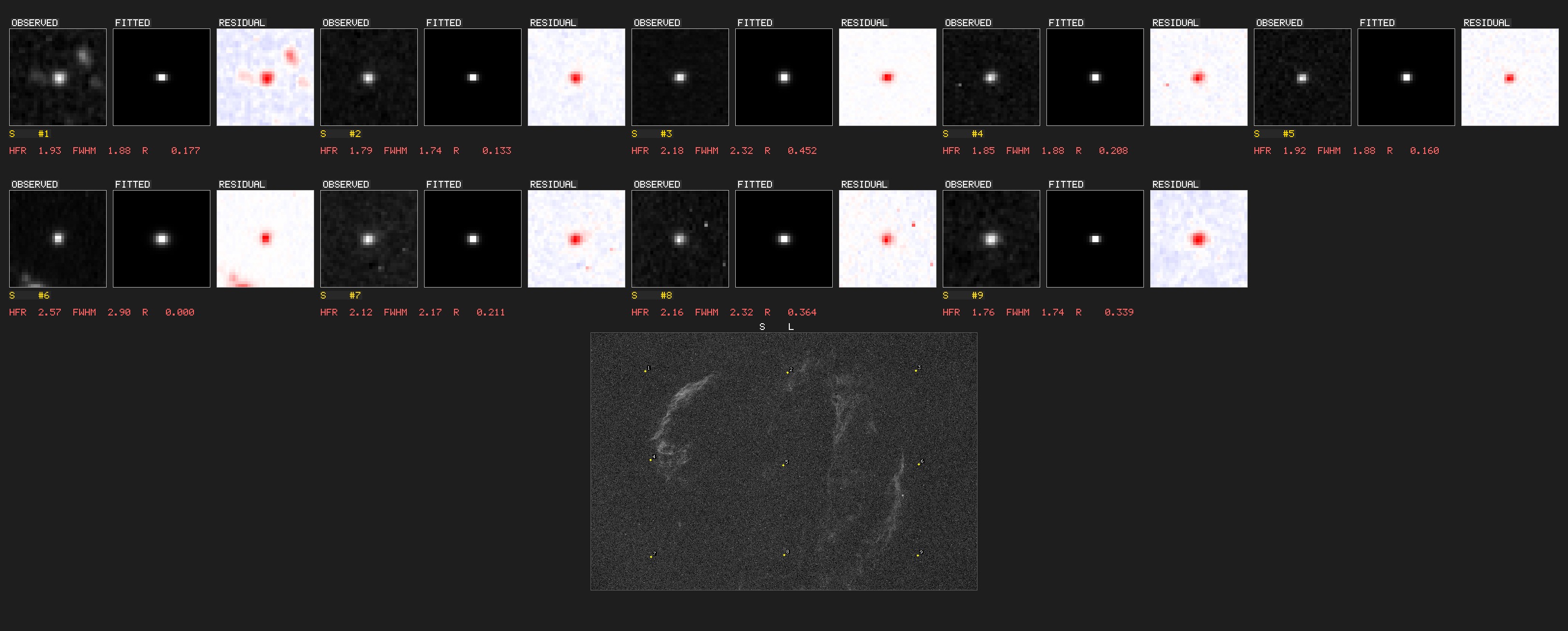
visualize-psf-multi draws observed, fitted and
residual grids with Moffat and Gaussian models.These commands read XISF files too. annotate-stars labels
each star with its HFR; --max-stars sets how many.
benchmark-detection records star count, HFR and time per frame
from a JSON manifest, and agreement with N.I.N.A.'s values where the manifest
has them.
FITS utilities
psf-guard stretch-to-png image.fits -o output.png    # MTF auto-stretch
psf-guard read-fits image.fits [-v]                  # header and metadata
Query databases and grade by hand
psf-guard -d database.sqlite list-projects
psf-guard -d database.sqlite list-targets "Project Name"
psf-guard -d database.sqlite dump-grading [--status rejected] [--project NAME] [--format csv]
psf-guard -d database.sqlite show-images 12,13,14
psf-guard -d database.sqlite update-grade 123 rejected --reason "Clouds"
psf-guard -d database.sqlite fill-guids [--dry-run]
psf-guard regrade database.sqlite [--dry-run] [--days 90]     # statistical regrade
fill-guids gives Target Scheduler rows that lack a GUID a new
one, after copying the database beside itself. Close N.I.N.A. on that rig
first. See Configuration.
regrade and filter-rejected take statistical
outlier flags: --enable-statistical with
--stat-hfr, --stat-stars,
--stat-distribution and --stat-clouds, for HFR and
star-count outliers per target and filter and for cloud onsets in a
sequence. See
docs/STATISTICAL_GRADING.md.